午饭摇号系统
作者Adularia类型Prompt
作品介绍
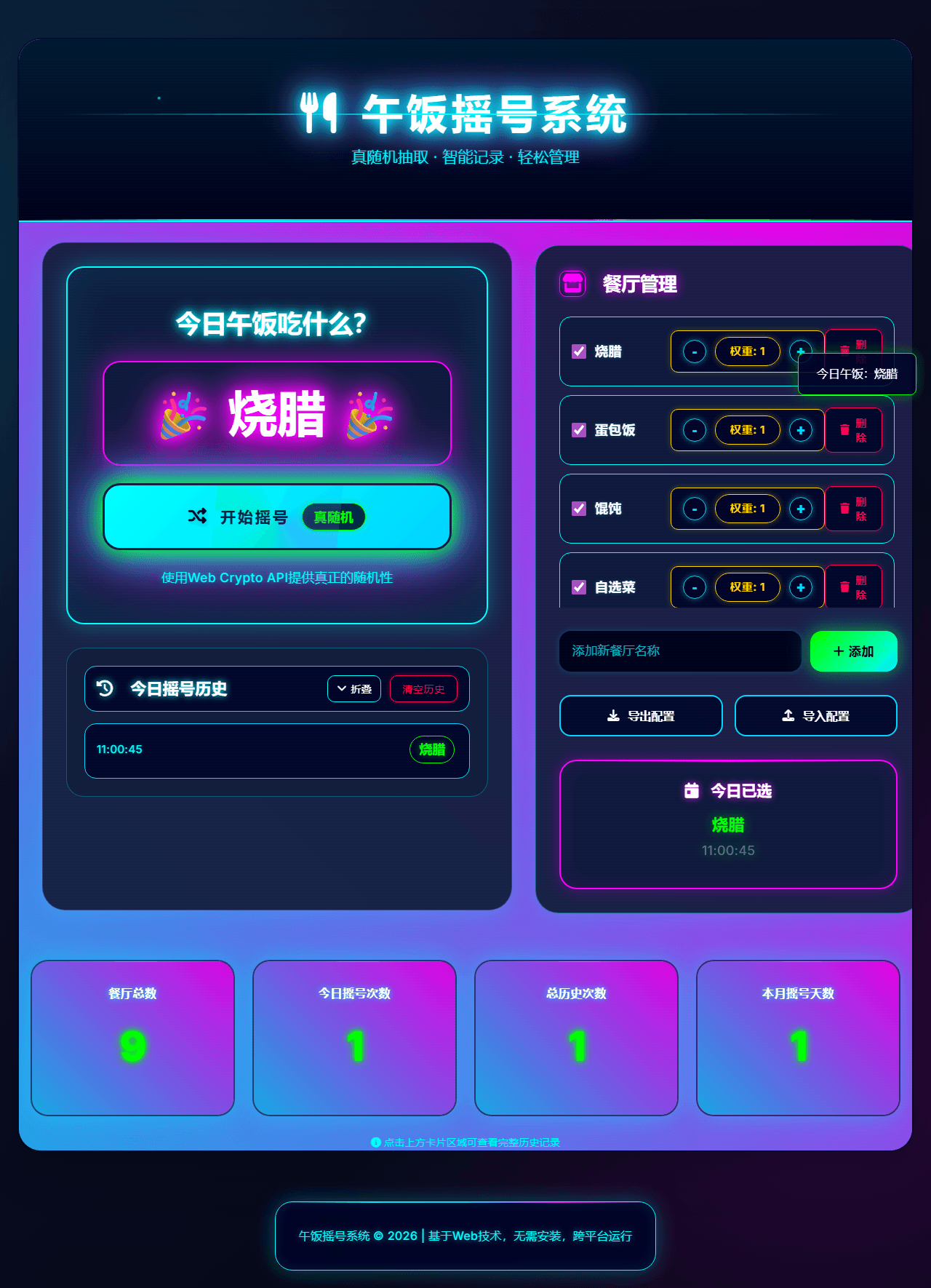
午饭摇号系统是一款部署在 EdgeOne Makers 上的每日午餐抽签 Web 应用,采用赛博朋克霓虹风格设计。核心价值在于将"吃什么"这一日常选择难题,转化为一场仪式感十足的赛博朋克抽签体验。 核心功能: 🎰 3 秒旋转动画摇号,ease-out 减速揭晓结果,仪式感拉满 ⚖️ 加权概率算法,每家餐厅可配置出现频率,告别"老挑那家" 📊 历史记录看板,追踪每日抽签结果 🔔 一键发送微信通知,群内同步午餐决策 ☁️ 基于 Edge Functions + KV Storage,无服务器全球加速,零运维 适用场景: 团队日常午餐决策、个人午餐选择困难症、公司内网工具部署
Prompt 内容
所有作品均通过 EdgeOne Makers Skill 生成并部署,具备CDN加速、安全防护能力,可按需接入后端服务。获取 Prompt 或 Skill后,在WorkBuddy中按指引操作(含 EdgeOne Makers Skill 安装步骤等),即可生成并上线你的同款网站。
午饭摇号系统 — Lunch Lottery System
1. Project Goal
Build a daily lunch lottery web application with a cyberpunk aesthetic (neon glow, glassmorphism, scan-line animations). The app helps users randomly select a lunch option from a weighted list of restaurants, tracks history, and sends WeChat notifications.
Core experience: Fun, anticipatory lottery animation → result reveal with neon glow → one-click WeChat share.
Must feel like: A high-end arcade lottery machine meets a cyberpunk dashboard — not a generic admin CRUD app.
Must NOT look like: A todo list, a survey form, a corporate dashboard, or a Bootstrap template.
2. Asset Inventory
No external CDN assets. All visuals are created with CSS only (neon gradients, box-shadows, CSS animations). Emoji are used as functional icons.
Emoji Inventory (use these exact emoji for UI elements):
3. Brand Guidelines
Product Name: 午饭摇号系统 (Lunch Lottery System)
Color Palette (CSS Variables):
```css
:root {
  /* Neon cyberpunk palette */
  --neon-cyan: #00ffff;
  --neon-pink: #ff00ff;
  --neon-green: #00ff00;
  --neon-yellow: #ffff00;
  --neon-red: #ff0055;
  --neon-purple: #b400ff;
  --neon-gold: #ffd700;
  /* Background */
  --bg-dark: #000428;
  --bg-darker: #00001a;
  --bg-card: rgba(0, 4, 40, 0.85);
  --bg-glass: rgba(0, 4, 40, 0.6);
  /* Text */
  --text-primary: #ffffff;
  --text-secondary: #00ffff;
  --text-accent: #00d4ff;
  /* Shadows (neon glow) */
  --glow-cyan: 0 0 20px rgba(0,255,255,0.8), 0 0 40px rgba(0,212,255,0.5);
  --glow-pink: 0 0 20px rgba(255,0,255,0.8), 0 0 40px rgba(180,0,255,0.5);
  --glow-green: 0 0 20px rgba(0,255,0,0.8), 0 0 40px rgba(0,255,0,0.5);
}
```
Typography:
- Headings: Inter, 700-800, letter-spacing 0.1em, uppercase for H1
- Body: Inter, 400-500, line-height 1.6
- Font fallbacks: system-ui, -apple-system, 'Segoe UI', sans-serif
Excluded Aesthetics (NEVER use):
- Flat/minimalist design (unless neon-accented)
- Corporate blue/white palettes
- Skeuomorphic realism
- Hand-drawn/casual illustration style
- Bootstrap default styles
4. Technical Stack
`
React 18 + Vite + TypeScript + Tailwind CSS
+ shadcn/ui + lucide-react
+ Framer Motion (for lottery animation)
+ EdgeOne Makers Edge Functions (API + KV Storage)
`
Fonts (Google Fonts):
- Inter: 400, 500, 600, 700, 800
Key dependencies:
```json
{
  "dependencies": {
    "react": "^18.3.0",
    "react-dom": "^18.3.0",
    "framer-motion": "^11.0.0",
    "lucide-react": "^0.400.0"
  },
  "devDependencies": {
    "@types/react": "^18.3.0",
    "@types/react-dom": "^18.3.0",
    "typescript": "^5.5.0",
    "vite": "^5.4.0",
    "tailwindcss": "^3.4.0"
  }
}
```
5. CSS Architecture
CSS Variables (src/index.css)
```css
:root {
  --background: 220 100% 2%;
  --foreground: 180 100% 50%;
  --primary: 180 100% 50%;        /* cyan neon */
  --primary-foreground: 0 0% 0%;
  --secondary: 300 100% 50%;      /* pink neon */
  --secondary-foreground: 0 0% 100%;
  --accent: 120 100% 50%;         /* green neon */
  --accent-foreground: 0 0% 0%;
  --destructive: 340 100% 50%;    /* red neon */
  --destructive-foreground: 0 0% 100%;
  --border: 180 100% 50% / 0.3;
  --radius: 16px;
}
```
Custom Component: .neon-glass
```css
.neon-glass {
  background: rgba(0, 4, 40, 0.85);
  backdrop-filter: blur(20px) saturate(120%);
  border: 1px solid rgba(0, 255, 255, 0.3);
  box-shadow:
    0 0 20px rgba(0, 255, 255, 0.3),
    0 0 40px rgba(0, 212, 255, 0.2),
    inset 0 1px 0 rgba(255, 255, 255, 0.08);
  position: relative;
  overflow: hidden;
}
/* Scan-line overlay */
.neon-glass::before {
  content: '';
  position: absolute;
  inset: 0;
  background: repeating-linear-gradient(
    0deg,
    transparent,
    transparent 2px,
    rgba(0, 255, 255, 0.03) 2px,
    rgba(0, 255, 255, 0.03) 4px
  );
  pointer-events: none;
}
```
Custom Component: .neon-border-flow
```css
.neon-border-flow {
  position: relative;
  border-radius: var(--radius);
}
.neon-border-flow::before {
  content: '';
  position: absolute;
  inset: -2px;
  background: linear-gradient(
    45deg,
    var(--neon-cyan),
    var(--neon-purple),
    var(--neon-pink),
    var(--neon-green),
    var(--neon-cyan)
  );
  background-size: 400% 400%;
  border-radius: inherit;
  z-index: -1;
  animation: borderFlow 6s linear infinite;
  opacity: 0.8;
}
@keyframes borderFlow {
  0%   { background-position: 0% 50%; }
  50%  { background-position: 100% 50%; }
  100% { background-position: 0% 100%; }
}
```
6. Layout Rules (Non-Negotiable)
Forbidden Layout Patterns (NEVER do these):
- No overlapping collage layouts
- No negative margins for decorative offset
- No staggered text/image misalignment
- No cards breaking grid alignment
- No full-width hero images that push content down (use constrained containers)
- No sticky elements that obscure the lottery result
- No text drifting outside the content wrapper
Global Layout Standards:
- One centered content container: max-width: 1400px; mx-auto
- Horizontal padding: px-6 md:px-10 lg:px-16
- Section spacing: py-16 md:py-24
- Consistent vertical rhythm with gap: 24px
Grid System:
Aspect Ratios:
- Lottery display: min-height: 320px
- Restaurant cards: auto height, consistent padding
- Stats cards: 1:1 (square-ish)
7. Reusable Components
TypeScript Interfaces
```typescript
interface Restaurant {
  id: string;
  name: string;
  emoji: string;        // default: 🍽️
  weight: number;       // 1-10, default 5
  enabled: boolean;     // default true
  lastSelected?: string; // ISO timestamp
  selectCount: number;  // total times selected
}
interface LotteryResult {
  id: string;
  restaurantId: string;
  restaurantName: string;
  timestamp: string;     // ISO string
  date: string;          // YYYY-MM-DD
}
interface Stats {
  totalRuns: number;
  topRestaurant: string;
  topRestaurantCount: number;
  lastRunDate: string;
}
```
Component: LotteryButton
```typescript
interface LotteryButtonProps {
  onClick: () => void;
  disabled?: boolean;
  isSpinning?: boolean;
}
```
Behavior:
- On click → trigger isSpinning state → rapid name cycling animation (100ms intervals) for 3 seconds → settle on result
- During spin: button glows intensifies, emoji rotates
- After result: result container pulses with neon glow
Component: RestaurantCard
```typescript
interface RestaurantCardProps {
  restaurant: Restaurant;
  onToggle: (id: string) => void;
  onRemove: (id: string) => void;
  onWeightChange: (id: string, delta: number) => void;
}
```
Component: HistoryList
```typescript
interface HistoryListProps {
  history: LotteryResult[];
  onClear: () => void;
  onExport: () => void;
}
```
8. Site Structure (7 Sections)
SECTION 1 — Fixed Navbar
- Fixed top, max-width: 1400px; mx-auto
- Left: neon glow logo text "🎲 午饭摇号"
- Right: status indicator (KV connected? WeChat configured?)
- Transparent → darkens on scroll
- Height: 64px
SECTION 2 — Hero / Lottery Display (min-h-[500px])
- Background: dark gradient + animated particle (single div with box-shadow multiple layers)
- Center: lottery result display container (.neon-glass + .neon-border-flow)
- Result text: font-size: 3.5em; font-weight: 800; with neon glow text-shadow
- Below result: "🎲 点击摇号" button (.neon-border-flow style)
- Button animation: idle pulse → rapid glow during spin → celebration glow on result
- CRITICAL: The spinning animation must cycle through restaurant names at 100ms intervals for exactly 3 seconds, then land on the selected result with a neon burst effect.
SECTION 3 — Restaurant Management (right panel on desktop, below lottery on mobile)
- .neon-glass container
- Header: "🍽️ 餐厅管理" + "➕ 添加" button
- Each restaurant: inline card with name, weight badge (🔥), enable/disable toggle, remove button
- Add form: input + "➕ 添加" button, inline validation
- Weight control: "⬆️ ⬇️" buttons, visual badge showing 1-10
SECTION 4 — Stats Cards (4 cards, below main content)
- .neon-glass cards in a 4-column grid
- Card 1: "📊 总抽签次数" + number
- Card 2: "👑 最常选中" + restaurant name
- Card 3: "🔥 今日已选" + restaurant name or "未抽签"
- Card 4: "📅 上次抽签" + date
SECTION 5 — History List (collapsible section)
- Header: "📋 抽签历史" + collapse toggle + "🗑️ 清空" button
- List items: date | time | result name with neon accent
- "导出 JSON" and "导出
SECTION 6 — WeChat Notification Config (modal or inline section)
- Input: WeChat push enabled? (toggle)
- If enabled: show Webhook URL input (for ClawBot/WorkBuddy integration)
- Test button: "发送测试消息"
- Note: WeChat push is implemented via Edge Function calling the WorkBuddy local API (http://127.0.0.1:7777/api/v1/push)
SECTION 7 — Footer
- "🎲 午饭摇号系统 | Built with EdgeOne Makers"
- Small: "数据存储在 Edge KV,永不丢失"
- Neon glow accent line on top
9. Edge Functions API Specification
Prerequisite: KV Storage must be enabled in the EdgeOne Makers console, a namespace created and bound to the variable name lottery_kv.
GET /api/restaurants
Returns: { restaurants: Restaurant[] }
- Reads from KV: await lottery_kv.get('restaurants', 'json')
- If not found, returns default restaurant list (see Default Data below)
- NEVER return raw KV errors to the client; always return a valid JSON response
POST /api/restaurants
Body: { restaurants: Restaurant[] }
- Saves to KV: await lottery_kv.put('restaurants', JSON.stringify(restaurants))
- Returns: { success: true }
POST /api/lottery
Body: { restaurantIds: string[] } (optional — if not provided, use all enabled from KV)
- Weighted random selection algorithm:
  ```typescript
  function weightedRandom(restaurants: Restaurant[]): Restaurant {
    const totalWeight = restaurants.reduce((sum, r) => sum + r.weight, 0);
    let random = Math.random() * totalWeight;
    for (const r of restaurants) {
      random -= r.weight;
      if (random <= 0) return r;
    }
    return restaurants[restaurants.length - 1];
  }
  ```
- Save result to KV history (key: history, value: LotteryResult[], max 100 entries, FIFO)
- Update restaurant selectCount and lastSelected
- Return: { result: LotteryResult }
GET /api/history
Returns: { history: LotteryResult[] }
- Reads from KV: await lottery_kv.get('history', 'json')
- Returns empty array if not found (do NOT return null)
POST /api/history/clear
Returns: { success: true }
- Clears history in KV: await lottery_kv.put('history', JSON.stringify([]))
POST /api/notify
Body: { message: string, imageUrl?: string }
- Calls WorkBuddy local API to push to WeChat
- Note: This only works when the Edge Function can reach 127.0.0.1:7777 (i.e., local dev or same-server deployment)
- For production, use WorkBuddy's cloud webhook URL instead
- Returns: { success: boolean }
GET /api/health
Returns: { ok: true, kv: boolean }
- Tests KV connectivity
- kv: true if lottery_kv.get('health_check') succeeds
10. Default Data (Pre-populate on first run)
IMPORTANT: This must be requested from the user (their preferred restaurants). The following is a DEFAULT suggestion only — the user may want different restaurants.
`
Default restaurants (Chinese lunch options, Hangzhou):
1. 烧腊饭 (emoji: 🍖, weight: 8)
2. 蛋包饭 (emoji: 🍳, weight: 7)
3. 馄饨/小笼包 (emoji: 🥟, weight: 6)
4. 自选菜 (emoji: 🥗, weight: 5)
5. 蒸菜 (emoji: 🍲, weight: 6)
6. 小面/拌粉 (emoji: 🍜, weight: 7)
7. 黄焖鸡 (emoji: 🐔, weight: 5)
8. 麻辣烫 (emoji: 🌶️, weight: 6)
`
Implementation: On first load, if GET /api/restaurants returns empty, the frontend should:
1. Show a "初始化默认餐厅?" prompt
2. If user confirms, POST /api/restaurants with the default list
3. If user declines, show the add-restaurant form
11. Implementation Requirements
Data Handling:
- DO NOT hardcode all restaurants in components — always fetch from /api/restaurants
- DO NOT use localStorage as the primary store — must use KV via Edge Functions
- Fallback: if KV is unavailable, use in-memory state with a warning banner "KV 未连接,数据仅保存在当前会话"
Weighted Random Algorithm:
- Must use the cumulative weight algorithm (see API spec above)
- Must exclude enabled: false restaurants from the lottery
- Must handle edge case: ALL restaurants disabled → show error "请至少启用一个餐厅"
Quality Standards:
- TypeScript everywhere (no any)
- Clean component structure (max 150 lines per component)
- Semantic HTML (<section>, <nav>, <header>, <footer>)
- Accessible: all interactive elements have aria-label
- Visible focus states (neon glow focus ring)
- Animations: use framer-motion AnimatePresence for list items
- NO bounce animations (unprofessional) — use smooth glow pulses and fades
WeChat Push Integration:
- On lottery result, automatically push to WeChat if enabled
- Message format: "🎲 午饭摇号结果\n\n🍽️ 今日午餐: [name]\n\n⏰ [time]"
- If push fails, show warning banner but do NOT block the UI
Deployment:
1. Use edgeone pages init to scaffold Edge Functions
2. KV binding name must be lottery_kv (tell the user to set this in the console)
3. Test locally with edgeone pages dev (runs on http://localhost:8088/)
4. Verify all APIs return correct JSON on localhost:8088/api/...
5. Deploy with edgeone pages deploy
6. After deploy, tell the user to go to the EdgeOne Makers console → KV Storage → create namespace → bind to variable name lottery_kv
12. Final Quality Bar
Must NOT look like:
- A generic React admin template (Ant Design, AdminLTE, etc.)
- A survey form or poll app
- A corporate intranet tool
- A children's game (too cartoonish)
- A default Vite + React scaffold
Must look like:
- A cyberpunk arcade lottery machine
- Neon signs in a futuristic night market
- High-energy, anticipatory, fun
- Polished glow effects (not overwhelming, not boring)
- Chinese-language UI with emoji-rich formatting
- Responsive: works on phone (portrait) and desktop (landscape)
Neon Glow Intensity Guidelines:
- Heading text: strong glow (0 0 20px, 0 0 40px)
- Body text: no glow or very subtle (0 0 5px)
- Buttons:中等 glow, intensifies on hover
- Result text: maximum glow (celebration effect)
- Cards: border glow only, no text glow
13. KV Storage Data Schema
Namespace variable name: lottery_kv
Note: KV is eventually consistent (60s global sync). For the lottery draw itself, use in-memory random selection — only persist the result to KV after selection.
14. Deploy Checklist (tell the user after build)
`
After edgeone pages deploy succeeds:
1. Go to EdgeOne Makers Console
   - China: https://console.cloud.tencent.com/edgeone/pages
   - Global: https://console.intl.cloud.tencent.com/edgeone/pages
2. Navigate to your project → "KV Storage"
3. Create a namespace (any name, e.g. lunch-lottery-kv)
4. Bind the namespace to variable name: lottery_kv
   (MUST be exactly lottery_kv — the Edge Functions code references this global variable)
5. Redeploy (or wait for auto-redeploy if using Git integration)
6. First visit: the app will prompt to initialize default restaurants
   → Click "确认" to load the default Hangzhou lunch options
   → Or click "自定义" to add your own
`
15. Critical Rules for the AI Builder
1. The lottery spinning animation is the hero moment. Spend time getting the 3-second spin → reveal transition right. The name cycling must be visible (not a loading spinner). Each name should flash with neon glow.
2. Chinese language UI. All button labels, section headers, and messages must be in Chinese. The code comments may be in English.
3. Emoji are functional, not decorative. Each emoji must have a clear semantic meaning (restaurant type, action, status).
4. Edge Functions MUST use the global lottery_kv variable. Do NOT use context.env.lottery_kv — KV is a global variable bound at the namespace level, not an env var.
5. The KV namespace name lottery_kv is a hard requirement. If the user binds a different name, the Edge Functions will crash with ReferenceError: lottery_kv is not defined. Always tell the user to use exactly lottery_kv`.
6. Mobile first, but desktop is the primary target. The user is in an office, on a desktop, deciding lunch with colleagues. The UI should feel social and fun on a desktop screen.
End of Prompt.

Install this skill: https://github.com/TencentEdgeOne/edgeone-pages-skills, then deploy to EdgeOne Makers.感谢支持
如果你觉得这些作品很酷,给我们的 Github 仓库一个 Star