Step 2: Write the Channel Information into the APK Package with EdgeOne Edge Functions
通过 EdgeOne 边缘函数,我们可以动态地将渠道信息写入到 APK 包内。用户只需访问与边缘函数绑定的域名并进行触发配置,就可以触发该边缘函数,从而实现 APK 的动态打包和加速分发。
步骤1:添加用于加速分发的加速域名
请根据 添加加速域名 指引添加加速域名,例如:
www.example.com 且源站配置为 Android APK 母包所在的对象存储 COS 自定义域名,详情可参见 存储桶切换自定义域名 。配置如下图所示:
说明:
该域名将用于访问下载 APK 安装包。
步骤2:创建用于触发渠道信息写入的边缘函数
1. 根据 函数管理 指引创建一个边缘函数,将如下代码复制到函数代码内。
const CUSTOM_BLOCK_VALUE_LENGTH = 10240;const APK_SIGNING_BLOCK_MAGIC_LENGTH = 16;const APK_SIGNING_BLOCK_OFFSET_LENGTH = 8;const APK_COMMENT_LENGTH = 512;class EdgePack {totalSize;signVersion;centralDirectoryOffset;customBlockValueStart;customBlockValueEnd;rangeRelativeOffset;customInfo;constructor() {this.totalSize = null;this.signVersion = null;this.centralDirectoryOffset = null;this.customBlockValueStart = null;this.customBlockValueEnd = null;this.rangeRelativeOffset = null;this.customInfo = null;}async handle(event) {const { request } = event;const headers = new Headers(request.headers);const modifiedRequest = new Request(request, { headers });if (!this.checkRequest(modifiedRequest)) {return;}let response = null;try {const headRequest = new Request(modifiedRequest.url, {method: 'HEAD',headers: modifiedRequest.headers,});response = await fetch(headRequest);} catch (err) {const error = {code: 'FETCH_ORIGIN_ERROR',message: err?.message,};response = new Response(JSON.stringify(error), {status: 590,});}if (!this.checkResponse(response)) {return event.respondWith(response);}response.headers.set('Cache-Control', 'max-age=0');const streamResponse = new Response(await this.combineStreams(modifiedRequest),response);event.respondWith(streamResponse);}getRelativeOffset(response) {const start = this.customBlockValueStart;const end = this.customBlockValueEnd;const range = response.headers.get('Content-Range');if (!range) return start;const match = range.match(/bytes\s*(\d*)-(\d*)/i);if (!match || match?.length < 2) {return start;}if (+match[2] < start || +match[1] > end) {return null;}return start - +match[1];}checkRequest(request) {if (request.method !== 'GET') {return false;}if (request.headers.has('Range')) {return false;}const { pathname, searchParams } = new URL(request.url);const comment = searchParams?.get('comment');if (!pathname.endsWith('.apk') || !comment) {return false;}this.customInfo = comment;return true;}checkResponse(response) {if (response.status !== 200 && response.status !== 206) {return false;}const contentLength = response.headers.get('Content-Length');if (response.body === null || contentLength === null) {return false;}this.totalSize = Number(contentLength);const cosOffsetHeader = response.headers.get('x-cos-meta-edgepack-offset');const cosTypeHeader = response.headers.get('x-cos-meta-edgepack-type');if (!cosOffsetHeader || !cosTypeHeader) {return false;}this.signVersion = cosTypeHeader;this.centralDirectoryOffset = Number(cosOffsetHeader);if (this.signVersion === 'v1') {this.customBlockValueStart = this.totalSize - APK_COMMENT_LENGTH;this.customBlockValueEnd = this.totalSize;} else {this.customBlockValueStart =this.centralDirectoryOffset -CUSTOM_BLOCK_VALUE_LENGTH -APK_SIGNING_BLOCK_MAGIC_LENGTH -APK_SIGNING_BLOCK_OFFSET_LENGTH;this.customBlockValueEnd = this.centralDirectoryOffset;}this.rangeRelativeOffset = this.getRelativeOffset(response);if (this.rangeRelativeOffset === null) {return false;}return true;}async combineStreams(request) {const { readable, writable } = new FixedLengthStream(this.totalSize);this.handleStream(request, writable);return readable;}async handleStream(request, writable) {const comment = this.customInfo;const relativeOffset = this.rangeRelativeOffset;const encoder = new TextEncoder();const section = encoder.encode(comment);try {const apkHeader = await this.apkHeaderStream(request);try {await apkHeader.pipeTo(writable, {preventClose: true,});} catch (e) {console.error('HEADER_STREAM_ERROR: ', e);}// 返回的是Blob数据const apkBody = await this.apkBodyStream(request,section,relativeOffset);const apkBodyStream = apkBody.stream();try {await apkBodyStream.pipeTo(writable, {preventClose: true,});} catch (e) {console.error('BODY_STREAM_ERROR: ', e);}const apkTail = await this.apkTailStream(request);try {await apkTail.pipeTo(writable, {preventClose: true,});} catch (e) {console.error('TAIL_STREAM_ERROR: ', e);}} catch (err) {console.error('HANDLE_STREAM_ERROR: ', err);} finally {let writer = writable.getWriter();writer.close();writer.releaseLock();}}async apkHeaderStream(request) {const headers = new Headers(request.headers);headers.set('Range', `bytes=0-${this.customBlockValueStart - 1}`);// 获取签名块之前的部分const headResponse = await fetch(request, {headers: headers,});return headResponse.body;}async apkBodyStream(request, section = null, relativeOffset = 0) {const headers = new Headers(request.headers);headers.set('Range',`bytes=${this.customBlockValueStart}-${this.customBlockValueEnd - 1}`);const middleResponse = await fetch(request, {headers: headers,});const reader = middleResponse.body.getReader();let outputBuffers = [];try {let handledBytes = this.customBlockValueStart;while (true) {const result = await reader.read();if (result.done) {console.log('APK_BODY_STREAM_DONE');break;}const startByteOffset = handledBytes;const buffer = result.value;handledBytes += buffer.byteLength;const min = Math.max(startByteOffset, relativeOffset);const max = Math.min(relativeOffset + section.byteLength, handledBytes);if (min < max) {const bufferStart = min - startByteOffset;const sectionStart = min - relativeOffset;const sectionEnd = max - relativeOffset;const replacement = section.subarray(sectionStart, sectionEnd);new Uint8Array(buffer).set(replacement, bufferStart);}outputBuffers.push(buffer);}} catch (err) {console.error('APK_BODY_STREAM_ERROR: ', err);}return new Blob(outputBuffers);}async apkTailStream(request) {const headers = new Headers(request.headers);headers.set('Range',`bytes=${this.customBlockValueEnd}-${this.totalSize - 1}`);const tailResponse = await fetch(request, {headers: headers,});return tailResponse.body;}}async function handleEvent(event) {const edgepack = new EdgePack();await edgepack.handle(event);}addEventListener('fetch', handleEvent);
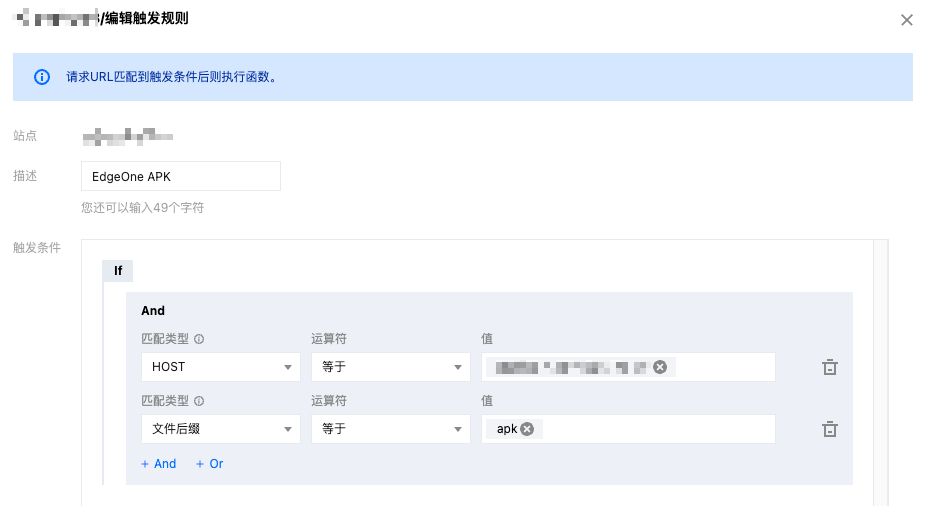
3. 单击确定,即可完成触发规则的创建。用户访问域名
www.example.com 且文件后缀为.apk时,即可触发边缘函数进行动态打包。步骤3:验证 EdgeOne 边缘函数是否已将渠道信息写入到 Android APK 包
在浏览器中输入带有渠道信息的 URL,例如:
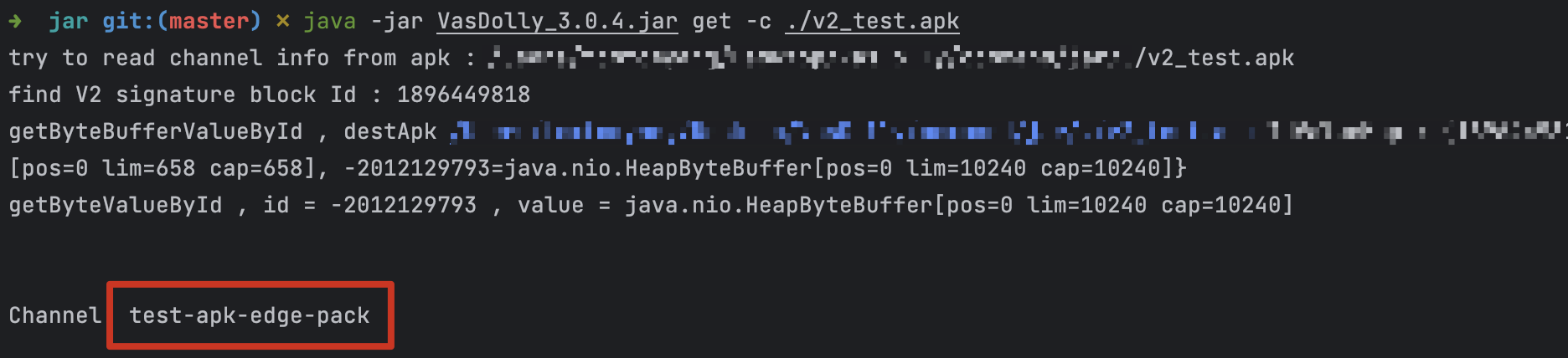
http://www.example.com/v2_src.apk?comment=test 即可触发边缘函数,动态地将渠道信息注入到指定位置,其中 comment 为您在 创建用于触发渠道信息写入的边缘函数 中定义的渠道参数。以 v2-VasDolly 方式为例,可以使用 VasDolly 多渠道打包工具来读取动态注入的渠道信息: