

Subscribing to Managed Rule Update Notifications
Overview
The EdgeOne security team continuously updates the WAF managed ruleset based on proprietary and third-party threat intelligence, including adding protection rules for new vulnerabilities (including 0-day vulnerabilities and high-risk CVEs), optimizing the detection accuracy of existing rules, and retiring outdated rules that are no longer applicable.
To help you stay informed of rule changes and manage security policies in a timely manner, EdgeOne provides the following three methods for rule update notifications. Regardless of which method you choose, the rule update content you receive is the same.
Notification Method | Form | Scenario |
When rules are updated, EO proactively pushes the WebSecurityManagedRulesNewVersion event through TCOP-Event Bridge. | Scenarios where rule update notifications need to be delivered to automated processing pipelines such as SCF, log services, or message queues | |
Standard RSS feed, updated synchronously with rule set version releases. | Use an RSS reader or a security operations platform to track rule changes on a daily basis. | |
Public rule update history page on the official website. | Manually view rule change history and handling suggestions. |
Configuring Event Notifications
When a rule change occurs in the managed ruleset (a rule is added, modified, or deleted), EdgeOne pushes the
teo:ErrorEvent:WebSecurityManagedRulesNewVersion event through TCOP-Event Bridge. The event details include the changeLogUrl field, which points to the official website update log page for this update, where you can view the summary, impact scope, and rule change details of this update. For event field descriptions, see EO Event and Alarm Notification Type Descriptions.Note:
This event is a platform-level notification that is triggered when a rule change occurs in the managed ruleset, regardless of the ruleset update method you have configured (automatic update, notification only without automatic update, or a specified version).
This event can only be subscribed to through the TCOP Event Bridge. The configuration steps are as follows:
Step 1: Configuring the Rule Pattern
1. Log in to the TCOP console. In the left navigation pane, choose Event Bridge > Event Rule. In the upper-left corner, select Guangzhou as the region and
default as the event bus. Click Create.2. In the Event Matching card, select EdgeOne as the cloud service type, Managed Ruleset Update as the event type, and All Instances as the matching object. For other related configurations, see Creating an Event Rule.
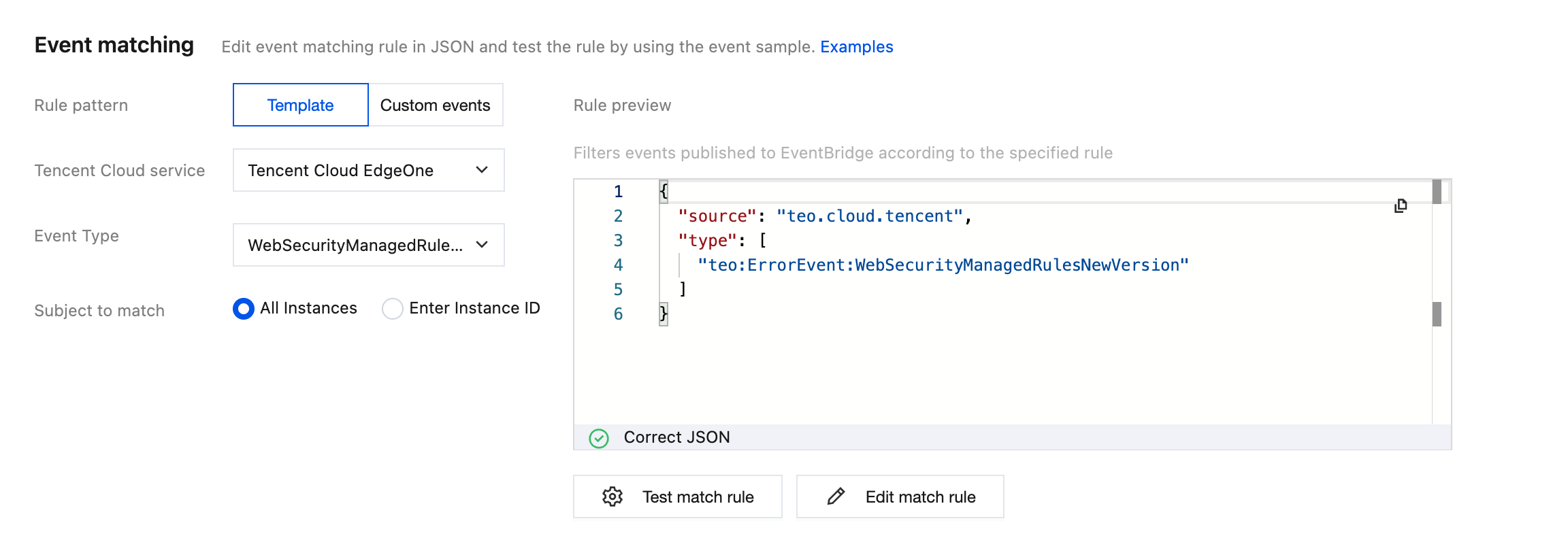
3. Click Next.
Step 2: Configuring the Event Target
1. Follow the on-page prompts to enter information about the final event target. The event targets currently supported by Event Bridge include SCF, CLS, message push, Ckafka, and Elasticsearch. For detailed configuration, see Event Targets.
2. Click Done to save the configuration.