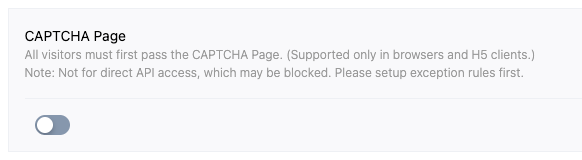
CAPTCHA page is a proactive defense feature based on client environment verification. The feature aims to identify and filter automation script traffic via mandatory interactive verification, verifying that business access is from legitimate users.
After enabling this feature, EdgeOne will perform Session Ticket verification on ALL HTTP/HTTPS requests within the target range. Requests without valid tickets will be intercepted and responded with an HTML page containing a CAPTCHA component. Upon completing the interactive verification, the system will issue credentials to allow subsequent requests.
Feature Applicable Scope
Scenarios
Enable in the following scenarios:
1. Limit common crawlers: when facing frequent automatic scraping jobs, and general IP blocklist and rate limiting strategy fail.
2. Application Layer DDoS Mitigation: When a server faces sudden application layer attacks (such as CC attacks), it needs to scrub malicious traffic with high interaction cost to guarantee origin server availability.
3. Key Path Protection: Protect high-value APIs such as login, registration, and coupon claiming to prevent automation scripts from credential stuffing or batch scraping.
Client Environment Requirements
The CAPTCHA page requires the client to meet at least the following requirements:
Support reading and returning HTTP Cookie.
Possess complete HTML rendering and JavaScript execution capabilities.
Incompatible Deployment Scenario
If your site has the following access scenarios, do not enable the CAPTCHA page directly on your site. Please ensure compatibility is verified on a test site before enabling this feature on the production site.
Attention:
If your site has incompatible deployment scenarios, enabling the CAPTCHA page directly may result in service interruption.
API service invocation: RESTful/GraphQL APIs called by third-party programs or scripts (such as cURL, Python requests, Postman). The client cannot process HTML responses and JS interaction, which can cause JSON parsing errors.
Native mobile App (Native App): A Native application that either uses an inactive View Component or is unable to share cookies with the network layer. The App will receive HTML code instead of business data, causing request failure.
Native mini program: Network requests in mini programs (such as wx.request) do not support DOM manipulation and HTML rendering, and are unable to complete CAPTCHA.
Non-browser static resource loading: images or CSS resources directly referenced by email client software, RSS readers, or other non-browser environments.
If any of the above scenarios apply, adopt one of the following recommendations:
Use a standalone domain name to deploy browser access business. Use different domain names for incompatible business scenarios. Enable the CAPTCHA page only for domain names accessed in the browser.
If you have subscribed to Advanced Bot Management, use custom rules in Bot Management instead. This allows you to specify a custom scope of CAPTCHA page by setting matching condition to exclude the request search engine feature and use managed challenge to handlie matching requests.
If SEO (search engine ranking optimization) is required, ensure exception rules targeting search engine crawlers are deployed before enabling the CAPTCHA page.
To maintain SEO inclusion and ranking, configure rules in the exception rule to set the handling action as skip BOT management module for requests where User-Agent contains search engine identification such as Googlebot or Bingbot.
Note:
When no exception rule is added, CAPTCHA page will block search engine crawler scrape requests because standard crawlers normally do not execute JavaScript.
Feature Overview
CAPTCHA page uses the following basic mechanisms:
Full interception and verification: Within the effective scope, ALL requests without valid credentials will be redirected to the verification page.
Client dependency: The authentication and invoice verification logic depends on the client's JavaScript execution environment and Cookie storage capability.
Status retention: After verification passes, EdgeOne writes an encrypted Cookie to the client as a session ticket. Subsequent requests carrying this Cookie can skip verification within its validity period.
Case Scenario
In the Web security analysis module, you observed a large number of accesses to the image resource /download/welcome.png under the site www.example.com. These IPs come from several clustered network segments and directly accessed the resource without visiting the website homepage, consuming considerable bandwidth. However, since there are many access IPs, the request count per single IP is only 1-2 times. Based on the access characteristics, it is suspected that distributed bots are misusing the download bandwidth. To enhance security, with consideration that the site only needs to support browser access and after confirming search engine crawlers have joined the exception rule, enable the CAPTCHA page to block BOT traffic.
Directions
1. Log in to the Tencent Cloud EdgeOne console, enter Service Overview in the left menu bar, and click the site to be configured under Website Security Acceleration.
2. Click Security Protection > Web Protection. By default, it is the site-level protection strategy. Click Domain-Level Protection Strategy Tab. In the domain-level security policy, click Target Domain Name to enter the target domain name protection policy configuration interface, such as: www.example.com.
3. Locate the Bot Management card, click the switch under CAPTCHA Page to launch the feature.
Attention:
Before enabling the feature, carefully evaluate incompatible deployment scenarios and confirm search engine access to prevent legitimate traffic from being blocked.