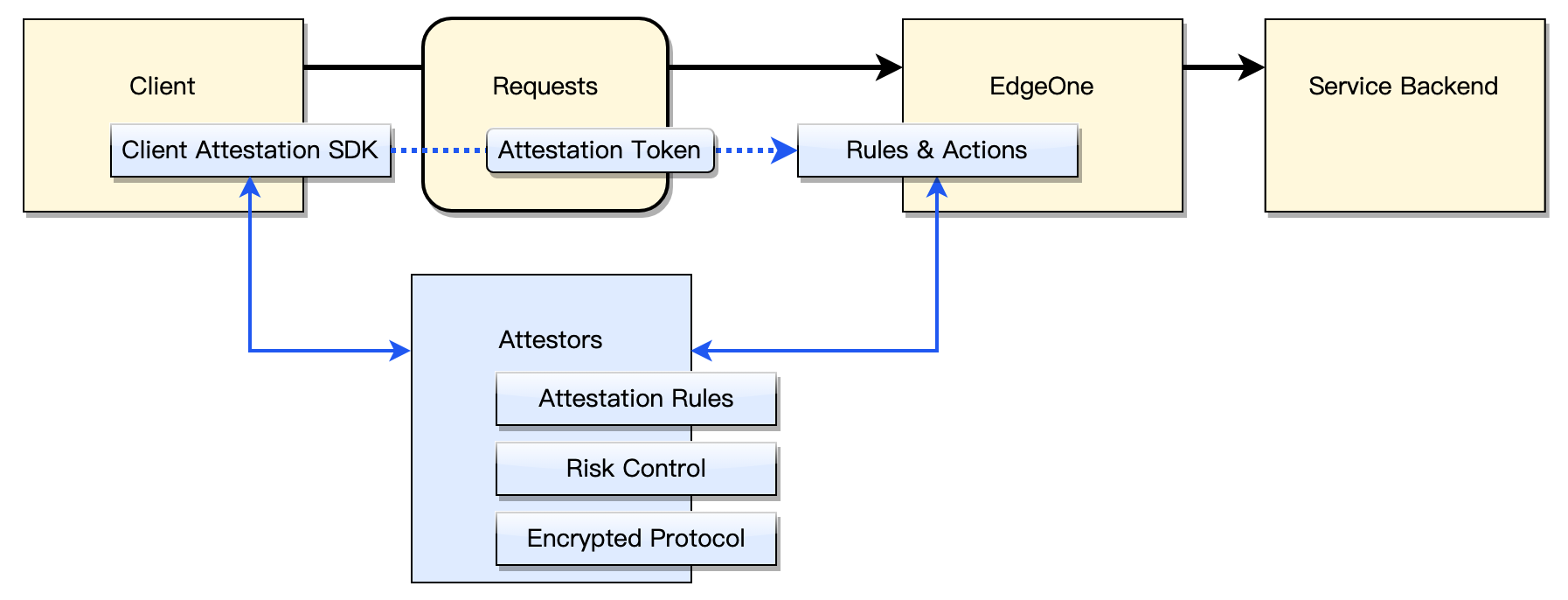
Client attestation identifies legitimate clients through endpoint security mechanisms, while verifying requests carrying identification info to detect abnormal sources, thereby defending against malicious crawlers and automation tool attacks. After enabling Client attestation, EdgeOne requires clients to complete additional verification (such as graphic Captcha) to obtain valid credentials. Clients carry these credentials in requests to certify they originate from trustworthy real users. This mechanism effectively distinguishes legitimate users from malicious automated processes, protecting backend service API security.
Use Cases
Client Attestation is suitable for core business scenarios that require verifying the authenticity of access sources. Typical applications include:
Core business API protection: Enable Client Attestation for critical APIs such as login, registration, order placement, and payment. Automated scripts and malicious crawlers are intercepted at edge nodes to prevent attacks such as credential stuffing, fake orders, and malicious registration. Legitimate users pass through without friction, while high-risk requests are accurately intercepted.
Mobile App anti-protocol abuse: Collect device environment information through the client-side SDK (risk features such as emulators, Root/jailbreak, HOOK injection, and repackaging) to identify and block protocol abuse requests and automation tools, protecting App backend APIs from being directly called by malicious scripts.
Mini Program risk control: Integrate the Client Attestation SDK component to collect device fingerprints and perform risk control challenges on WeChat Mini Program requests, preventing risks such as Mini Program debugging, emulator execution, and SDK protocol tampering.
Deep verification in Bot management: Used in conjunction with security capabilities such as EdgeOne Bot intelligent analysis and rate limiting, Client Attestation challenges are triggered for suspected Bot traffic, and only verified legitimate clients are allowed through. This achieves a layered protection chain from traffic identification to client-side verification.
Why Use Client Attestation
Unlike the crawler identification method based on traffic volume feature extraction, Client attestation has the following features:
1. Perform risk control recognition on the client: The client can extract more environment information for more accurate recognition judgment of client features, enabling more effective Bot detection.
2. Edge Proximity Risk Control Handling: EdgeOne integrates Client attestationcapability at the edge, enabling nearby request handling to reduce service backend workload consumption for processing crawler traffic to the maximum extent.
3. Multiple attestation options: Support various risk control options. Once integrated, you can flexibly select and adjust risk control strategies online.
Supported Client Types
Client attestation offers cross-platform SDKs for integrating attestation capability in various client environments. Currently supports the following client formats:
Browser and Webview Clients: Modern mainstream browser environments, including Mobile WebView. Supports web applications (Single Page Application) implemented based on AJAX framework. The browser must support Promise, Fetch, and Crypto API for the SDK to run properly. The earliest supported versions are as follows:
Chrome ≥ 90
Firefox ≥ 90
Safari ≥ 11
Edge ≥ 90
Mobile WebView (iOS ≥ 11, Android WebView ≥ 67)
Opera ≥ 76
Native iOS and Android Applications: Provides native SDKs for iOS and Android platforms (supports Objective-C, Swift, and native Android applications). These mobile SDKs enable seamless integration of Client attestation functionality within apps. The earliest supported versions are as follows: