In complex origin-pull scenarios, requests may not return to the same origin server. For example, based on Client IP Geolocation, requests can be routed to the nearest origin server to reduce network impact caused by cross-region access. EdgeOne provides the ability to modify the origin server, supporting the use of different match conditions in the rule engine to route compliant requests to the designated origin server.
Applicable Scenarios
Avoid network impact from cross-region access: When users in the Chinese mainland pull content from an origin server outside the Chinese mainland, it may pose higher access latency or origin-pull request failures. Modifying the origin server allows users to route requests to origin servers within the same region by region, ensuring origin-pull effect. For example: Users in the Chinese mainland pull content from Origin Server A, while users outside the Chinese mainland pull content from Origin Server B.
Ensure compliance with local legal and regulatory requirements: When handling global business expansion, to meet local legal and regulatory requirements, you can store the origin server and data on local servers, allowing users in specified regions to directly send origin-pull requests to local servers.
Website content distributed across different origin servers: If files from the same website are distributed across multiple different origin servers, such as storing static files in a Cloud Object Storage (COS) bucket with lower storage costs, you can modify the origin server to specify the access path or file suffix for pulling content from other designated origin servers.
Operation Steps
Scenario 1: Regional Routing to Origin Servers in Different Geographic Regions
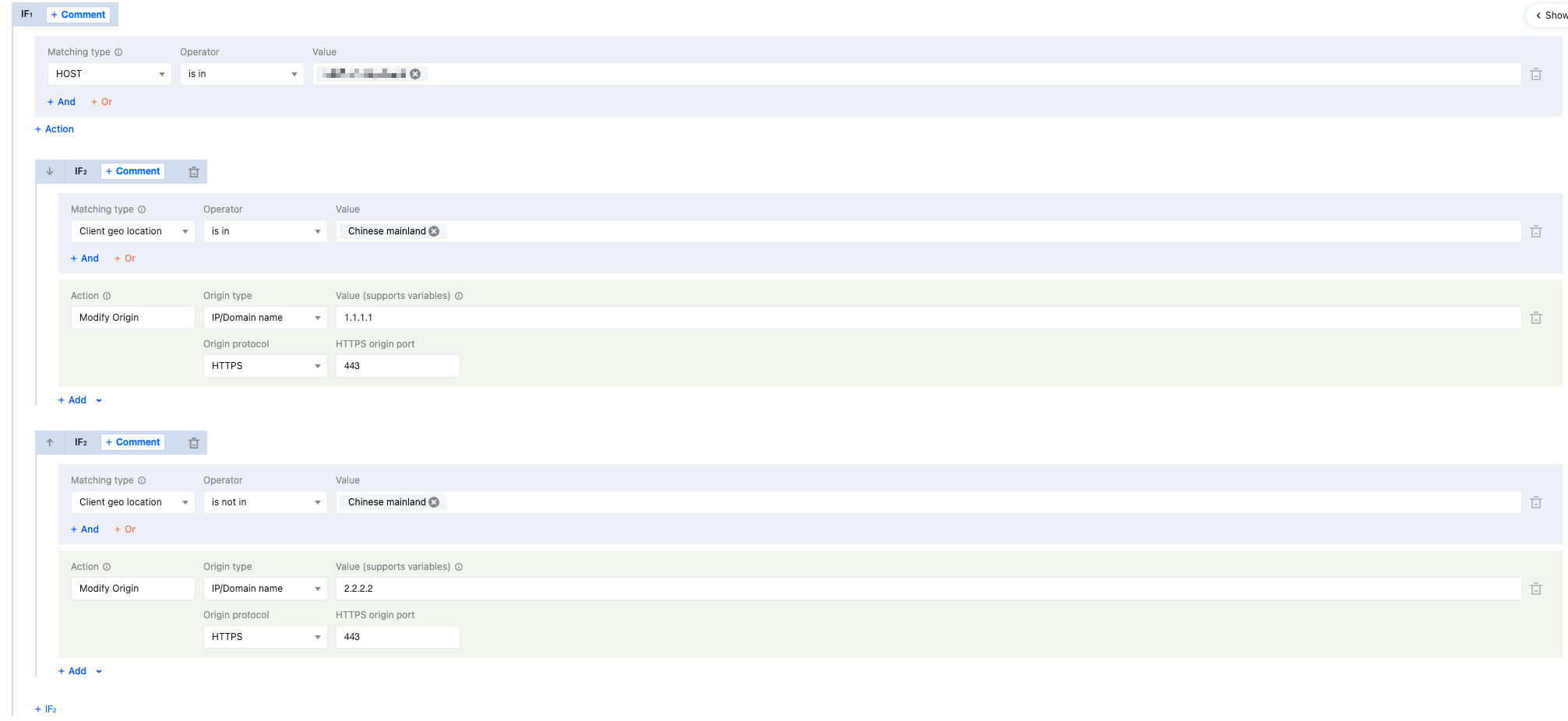
For example: The current domain www.example.com has a global availability zone for acceleration. To better serve users and guarantee origin quality, origin servers are deployed within the Chinese mainland 1.1.1.1 and overseas 2.2.2.2, ensuring users in corresponding regions pull content from origin servers within the same region. Configuration steps are as follows:
1. Log in to the Tencent Cloud EdgeOne console, in the left menu bar, enter Service Overview, and click the Website security acceleration site that requires configuration .
2. On the site details page, click Site Acceleration to enter the site global configuration page, then click the Rule Engine Tab.
3. On the rule engine page, click Create Rule, select Add Blank Rule, and enter the editing page for the new rule.
4. On the Rule Editing Page, set the match type selection to HOST is in www.example.com.
5. Click
, add new IF condition, set the match type selection to client geo location is in Chinese mainland, select modify origin for operation selection, configure the origin server type as IP/domain, and point to 1.1.1.1;
6. Click on Add, create ELSE IF condition, set the match type selection to client geo location is not in Chinese mainland, select modify origin for operation selection, configure the origin server type as IP/domain, and point to 2.2.2.2;
7. Click save and publish to complete the configuration.
Scenario 2: File Routing From Specific Path to Specified Origin Server
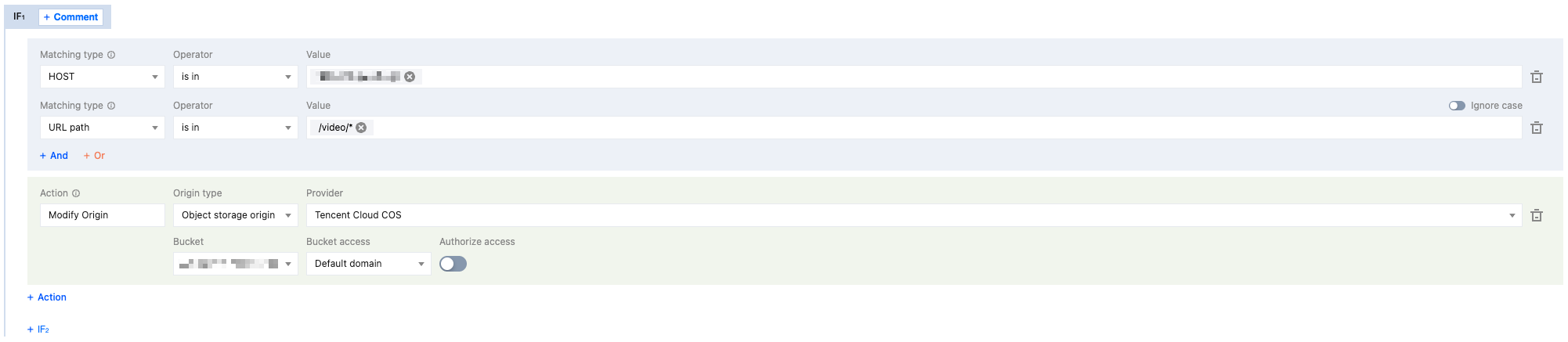
For example: The origin server for the current domain www.example.com is 1.1.1.1. This origin server mainly processes dynamic data requests, while all static video files are stored in Tencent Cloud COS with the access path /video/. You can modify the origin server to route requests back to the corresponding origin based on the path to get files. The configuration process is as follows:
1. Log in to the Tencent Cloud EdgeOne console, in the left menu bar, enter Service Overview, and click the Secure Content Delivery Network site that requires configuration .
2. On the site details page, click Site Acceleration to enter the site global configuration page, then click the Rule Engine Tab.
3. On the rule engine page, click Create Rule, select Add Blank Rule, and enter the editing page for the new rule.
4. On the Rule Editing Page, set the match type selection to HOST is in www.example.com, then add new And match type as URL Path is in /video/*.
5. Click Operation > Selection Box, in the pop-up actions list, select the operation as Modify Origin, set the source server type to Tencent Cloud COS, manufacturer source to Tencent Cloud COS, and select the corresponding bucket.
6. Click save and publish to complete the configuration.