

Extra Package Auto-renewed Guide
Extra Package Renewal
EdgeOne extra packages support enabling auto-renewal. When you enable this feature, the extra package will be automatically renewed upon depletion or expiration. If your account has sufficient balance, the system will automatically purchase a new extra package for you according to the auto-renewal rules. The new package will have the same specifications and validity period as the original one.
Auto-renewal rules
1. When you enable auto-renewal for an extra package, you will receive a 5% discount on the price for both the initial purchase and subsequent auto-renewals.
2. An extra package purchased through auto-renewal will have the same specs and validity period as the original extra package that had auto-renewal enabled.
3. If the account balance is insufficient and the extra package renewal fails, the auto-renewal status of the extra package will be changed to off, and the usage that cannot be deducted by the extra package will be billed according to the postpaid tiered pricing in each region. For details, please view the Fees for Out-of-plan Resource Usage (Pay-as-You-Go).
4. Only one extra package of the same type can have auto-renewal enabled. If you enable auto-renewal for another package of the same type, the previous setting will be replaced. For example, if a 100 GB SCDN traffic package already has auto-renewal enabled, enabling it for a 500 GB SCDN traffic package will directly override the previous setting. The same applies to SCDN request packages.
5. After the auto-renewal of the extra package is enabled, the same specs and validity period of the extra package will be automatically renewed after it is used upNote 1or expiresNote 2.
Note:
Note 1:
If the renewal is triggered by the extra package being used up, it will be judged whether there are other available extra packages in the current account. If there are, the other available extra packages will continue to be consumed until all available extra packages are used up, and then the same specs and validity period of the extra package will be renewed. If there are none, the renewal will be done directly.Note 2:
If the renewal is triggered by the expiration of the extra package, the same specs and validity period of the extra package will be automatically renewed after the usage settlement is completed within the corresponding settlement cycle of the expiration time. For example, if it expires at 11:20 on July 30, 2023, the renewal operation will be executed after the usage settlement is completed between 11:00 and 12:00.Example:
Suppose you purchased a security acceleration traffic package with a specs of 500 GB and a validity period of 12 months at 23:00:00 on July 9, 2023. The expiration time of this traffic package is 22:59:59 on July 9, 2024. If you enable auto-renewal for this traffic package, it will either be renewed with a specs of 500 GB and a validity period of 12 months when it is used up or at 23:00:00 on July 9, 2024.
Auto-renewal operation
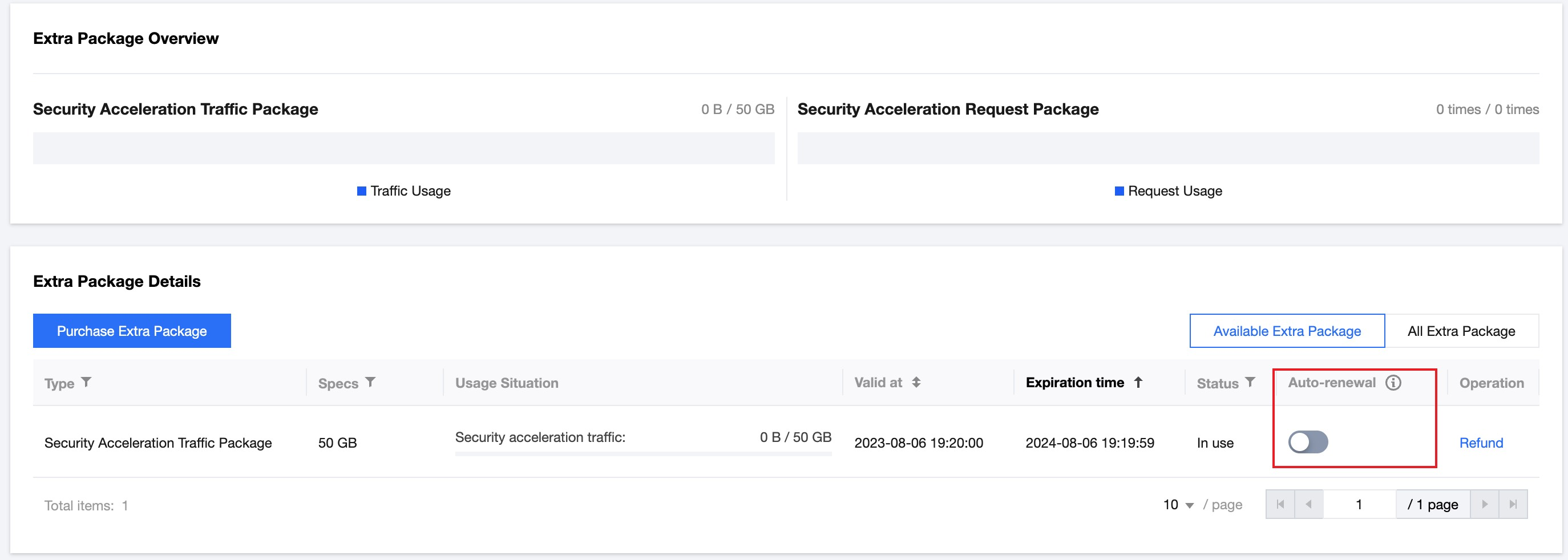
You can enable auto-renewal via Tencent Cloud EdgeOne Console > Extra Package Management. For detailed steps, refer to the following document:
1. On the Extra Package Management page, select the extra package that needs to be auto-renewed, and click the auto-renewal status button, as shown in the figure below:
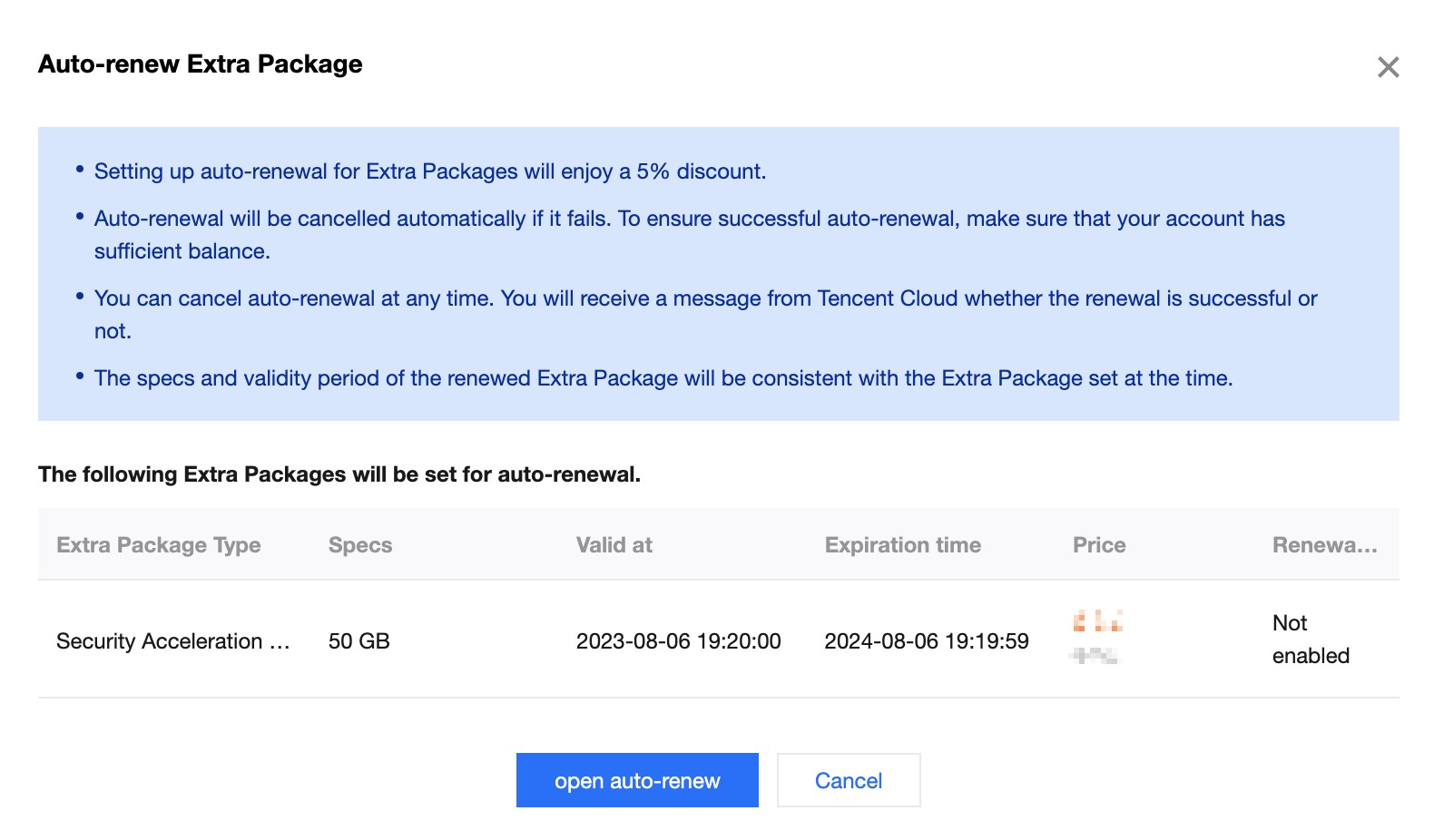
2. In the auto-renewal window, confirm the information of the extra package to be renewed, and click auto-renewal.
3. If there is already a Type data package with automatic renewed setting, click continue in the pop-up reconfirm window after confirming correctly.