

DDoS Protection Console Update (2026-01-12)
To provide a high-quality product experience and services, the EdgeOne DDoS protection console was upgraded on January 12, 2026. This update aims to simplify the operation process and optimize the billing mode. This document introduces the primary optimization points of the new version, as well as variations between the old and new version console, to help you smoothly transition to the new version.
Note:
This upgrade has no impact on the existing services, business operations, protection specs, and security policy configuration of customers who have already subscribed to exclusive DDoS protection. They can continue normal usage. For new purchases or changes to DDoS protection instances, contact us to switch to the new billing model in the backend.
New Version Main Optimization Points
More Flexible Billing Mode
Flexible package options: Two mitigation sessions per month (Essential plan) and unlimited mitigation sessions (Premium plan) are provided. Users can select different packages as needed based on the severity of attack risk. The billing mode is easier and more transparent, making it easy to understand.
Reduce the impact of attacks on protection budget: Protection against attacks within 200Gbps in the Chinese mainland no longer requires payment for elastic protection bandwidth, saving user expenses. Additional Chinese mainland protection capacity add-on is provided, supporting upgrade to Tbps-level protection to meet protection needs at different scales.
Comprehensive protection in each region: The new version package supports comprehensive protection in the Chinese mainland and outside Chinese mainland with no need to purchase separately, meeting users' global protection needs.
Layer-4 and layer-7 unified binding: Both L4 proxy instances and layer-7 domain names are bindable for protection, enabling unified management and enhancing protection flexibility.
For the complete billing details, please see: DDoS Defender fees (pre-paid & post-paid)
Improved User Experience
Unified management interface: The new version UI design is more simple and intuitive. Users can complete ALL protection configurations in the uniform instance management interface (domain name management, layer-4 proxy instance list).
Simplified operation process: Reduce redundant redirection. Users can configure protection levels and security policy configuration faster to improve operational efficiency.
Differences between New and Old Version Interfaces
Note:
1. The following content is for reference only regarding the differences between the old and new interface. For the complete operation guide, please see Configure DDoS Protection for Domain Name or Layer 4 Proxy Instance.
2. Before using the new version DDoS protection configuration interface, complete one-time service role authorization according to the console guide for EO to call the DDoS API to manage DDoS protection status and L3/4 DDoS protection policy configuration.
Manage Domain DDoS Protection Configuration
Scenarios | Previous Version | New Version |
Configure DDoS protection at site level | After subscribing to an exclusive DDoS protection instance, manage it on the Security Protection > DDoS Protection > Site (L7) Service Protection webpage using the Enable Protection for All Domains (including domains added later) switch. | You can view and manage the acceleration and DDoS protection configuration of each domain in the uniform domain name list. 1. On the Domain Service > Domain Name Management webpage, click the edit button for site-level Anti-DDoS protection level (including newly added domain name) configuration. 2. In the modify site-level DDoS protection level (including newly added domain name) pop-up window, select target protection level configuration, and click confirm to save configuration. 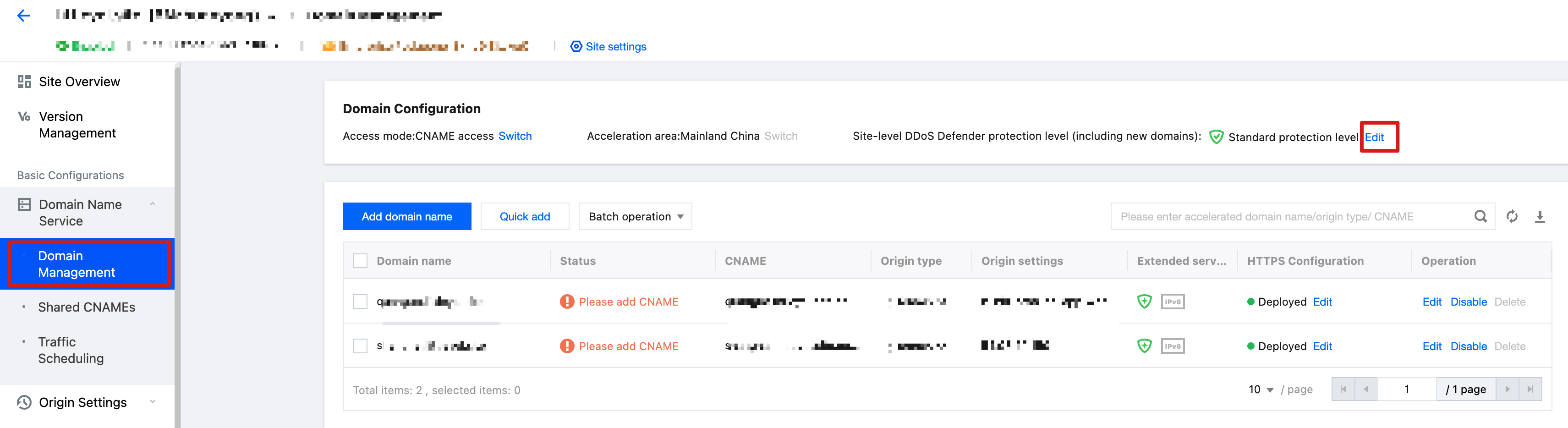 |
Configure DDoS protection at subdomain level | After subscribing to an exclusive DDoS protection instance, enable exclusive DDoS protection targeting a single domain on the Security Protection > DDoS Protection > Site(L7) Service Protection page. | 1. On the Domain Service > Domain Name Management webpage, hover over the security protection icon in the scale-out service column, then click modify protection level in the bubble. 2. In the modify domain name DDoS protection level pop-up window, select target protection level configuration, and click confirm to save configuration. 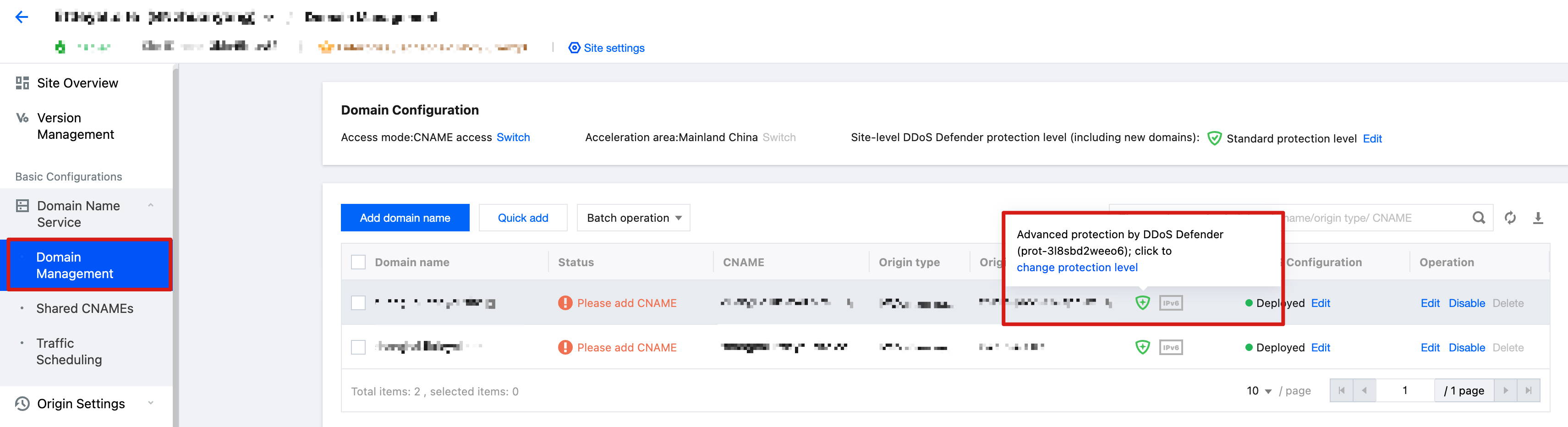 |
Batch configure DDoS protection for multiple domain names | After subscribing to an exclusive DDoS protection instance, on the Security Protection > DDoS Protection > Site(L7) Service Protection webpage, check multiple domain names and click the Batch Enable button. | 1. On the Domain Service > Domain Name Management webpage, select the configured domain name. 2. Click batch operation > batch modify DDoS protection level above the list. 3. In the batch modify DDoS protection level pop-up window, select target protection level configuration, and click confirm to save configuration. 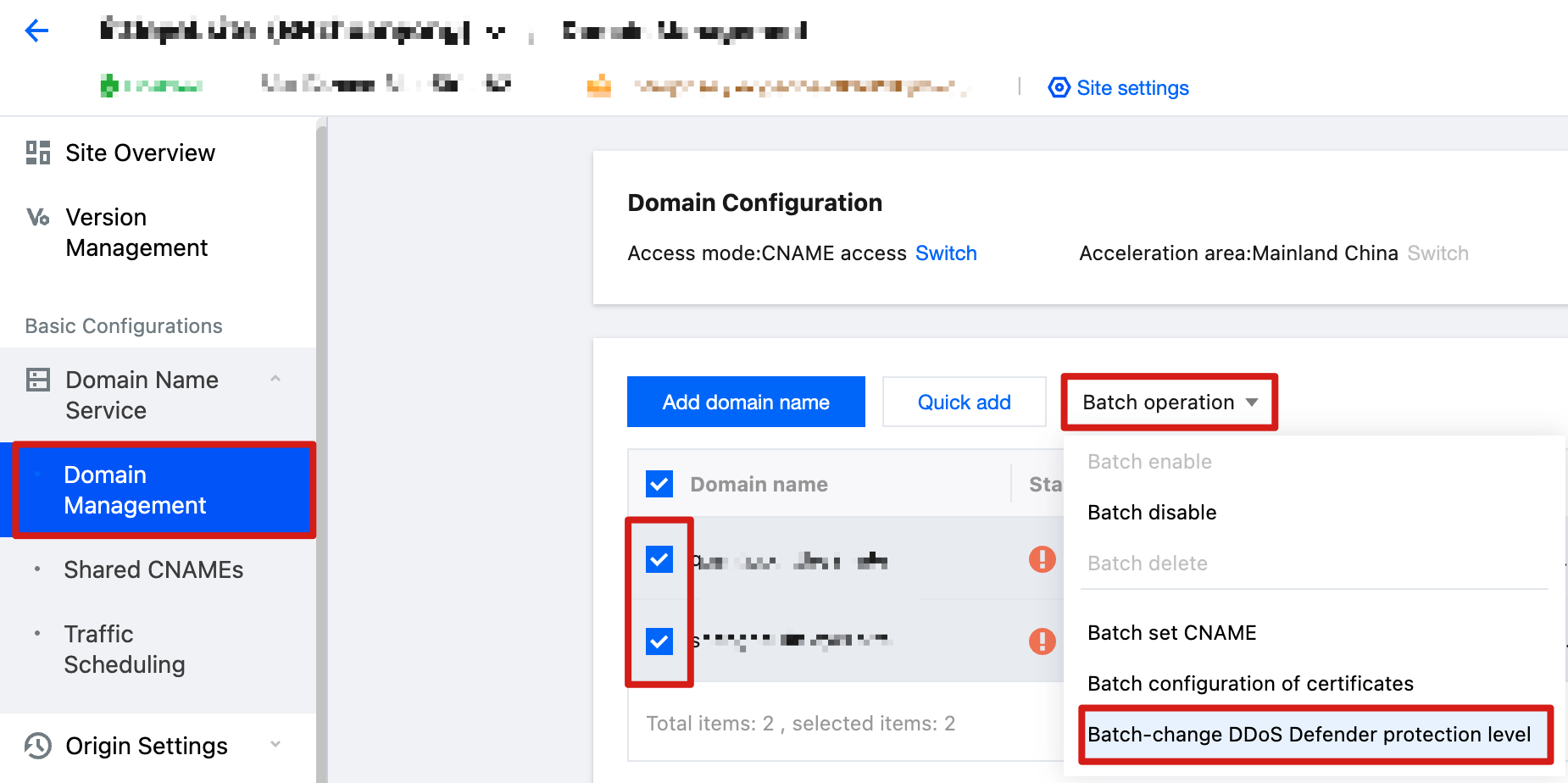 |
Manage L4 Proxy Instance Anti-DDoS Protection Configuration
Scenarios | Previous Version | New Version |
Configure DDoS protection for L4 proxy instance | On the create Layer 4 proxy page, choose to subscribe to exclusive DDoS protection specification. | 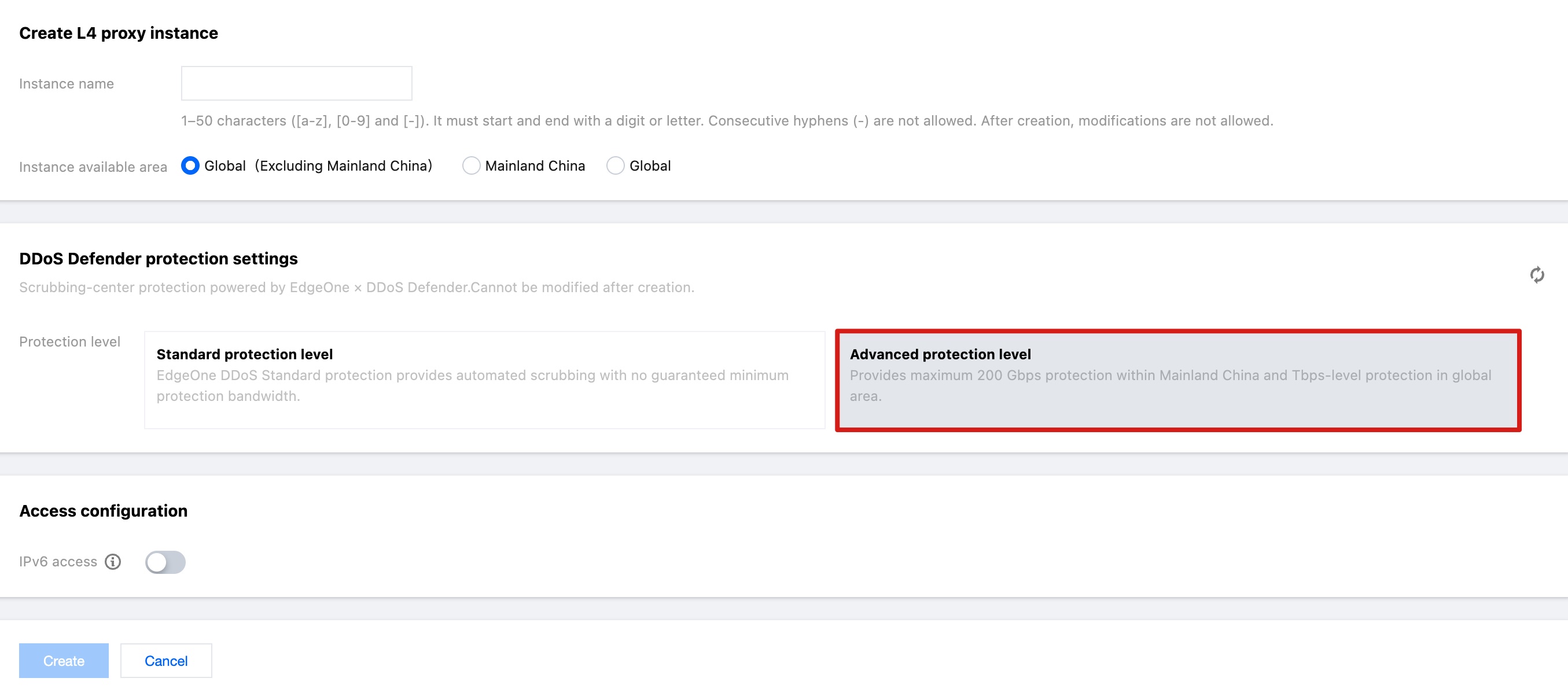 |
Configure L3/4 DDoS protection policy for Layer 4 Proxy Instance | On the Security Protection > DDoS Protection > L4 Proxy Protection webpage, select the L4 proxy protection instance that needs to be configured, and click Protection Configuration. | You can view and manage the acceleration and DDoS protection configuration of each L4 proxy instance in the uniform layer-4 proxy instance list. On the Layer 4 proxy list page, click security policy configuration in the operation column to enter the security policy configuration page and configure the L3/4 DDoS protection policy. 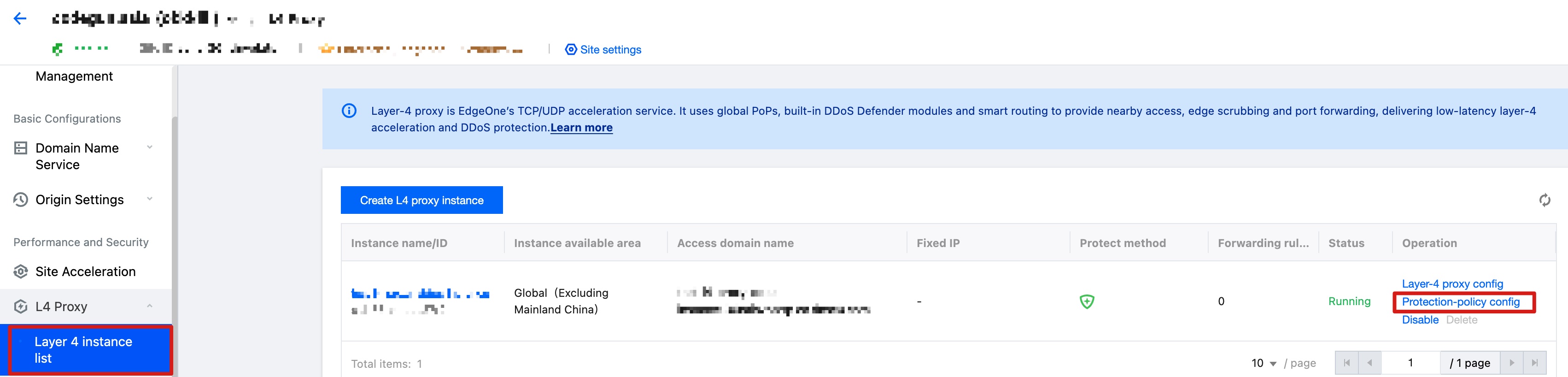 |