For enterprise and developer customers who need to frequently iterate business logic or conduct sophisticated global operations, edge functions provide flexible canary release and regional execution solutions when facing challenges such as high risk of launching new functions, difficulty in migrating old functions, and differences in compliance and marketing strategies in different regions.
Use Cases
By using weighted traffic allocation (weighted distribution, specific IPs, specific regions, etc.) for fine-grained traffic scheduling, customers can achieve the following:
1. New function verification and release: For newly developed/iterated edge functions (such as feature upgrades and logic optimizations), weighted traffic allocation (weighted distribution, specific IPs, specific regions, etc.) verifies the functionality and compatibility of the function, reducing the risk of full release;
2. Smooth transition across functions: When older functions need to be gradually migrated to new functions, weighted or region-based triggering allows for batch switching of traffic across different ranges, achieving a seamless transition;
3. Scenario- and region-specific execution of business logic: Different regions require different logic (such as region-specific discount calculations and compliance adaptations). Region-specific triggering rules bind different functions to each region.
Scenario 1: New Function Validation and Deployment
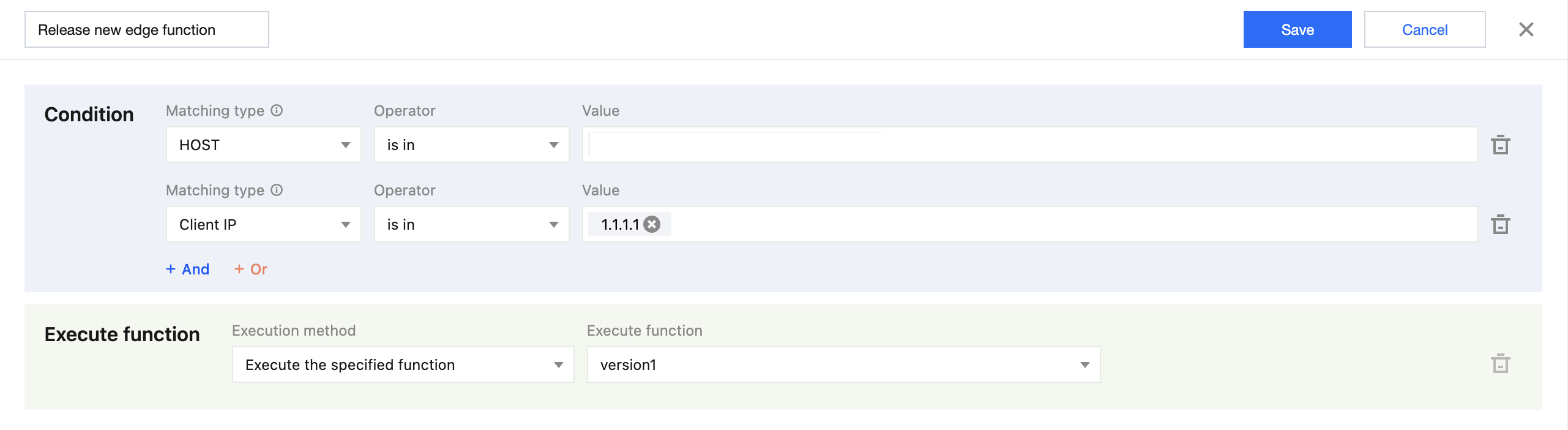
Method 1: Triggered by Client IP
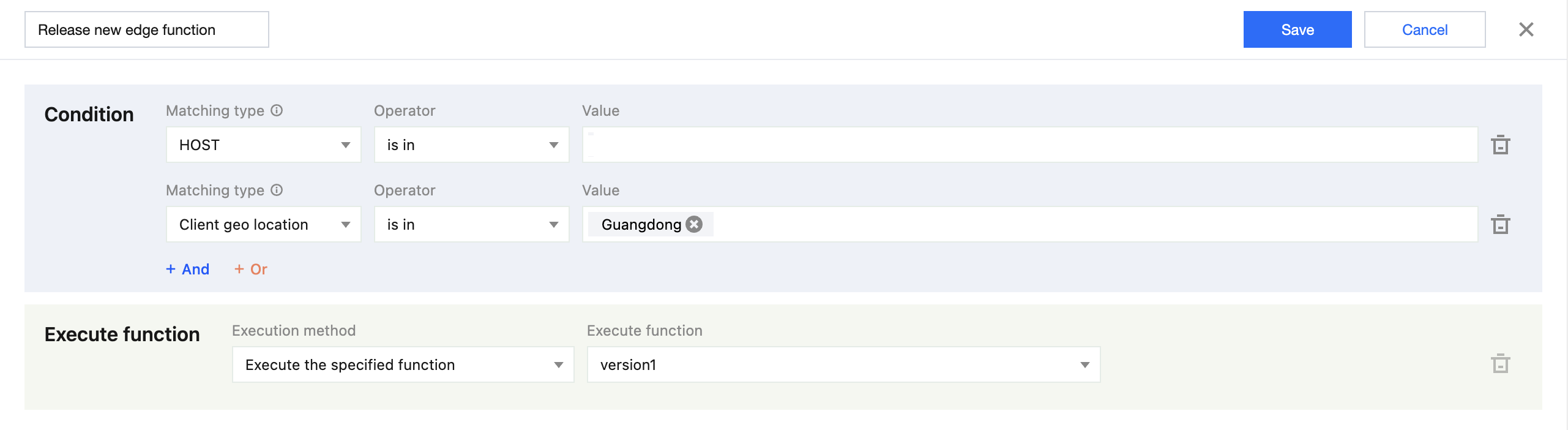
Method 2: Gray-scale verification based on client region
Example Scenario
Imagine you are an edge function engineer who has developed a new function, version1, on EdgeOne. You need to execute and verify the stability of version1 for users with client IP address 1.1.1.1. This approach uses traffic isolation mechanisms to ensure that the business experience of ordinary users on the existing network remains completely unaffected during the new feature acceptance process.
Directions
1. Log in to the Tencent Cloud EdgeOne console, enter Service Overview in the left menu bar, and click the site to be configured under Website Security Acceleration.
2. On the site details page, click Edge Functions > Trigger Configuration. On the Trigger Configuration page, click Create Trigger Rule
on the right side of the rule list. Based on the current example scenario, the configuration is as follows:
2.1 In the Condition, select HOST equals www.example.com as the match type.
2.2 In the Condition, select Client IP equals 1.1.1.1 as the match type.
2.3 In the Condition, select Execute the specified function as the execution method, and select version1 as the execute function.
3. Click Save to complete the configuration of the trigger rule.
Example Scenario
Imagine you are an edge function engineer who has developed a new function, version1, on EdgeOne. You need to execute and verify the stability of version1 for users in Guangdong Province. By implementing regional market validation and risk isolation, you can ensure that other regions continue to use their existing business logic, completely unaffected by the release of version1, thus achieving a low-risk, phased, and smooth evolution of the business.
Directions
1. Log in to the Tencent Cloud EdgeOne console, enter Service Overview in the left menu bar, and click the site to be configured under Website Security Acceleration.
2. On the site details page, click Edge Functions > Trigger Configuration. On the Trigger Configuration page, click Create Trigger Rule
on the right side of the rule list. Based on the current example scenario, the configuration is as follows:
2.1 In the Condition, select HOST equal to www.example.com as the match type.
2.2 In the Condition, select Client geo location equal to Guangdong as the match type.
2.3 In the execution function, select Execute the specified function as the execution method, and select version1 as the execute function.
3. Click Save to complete the configuration of the trigger rule.
Scenario 2: Function Version Gradual Upgrade
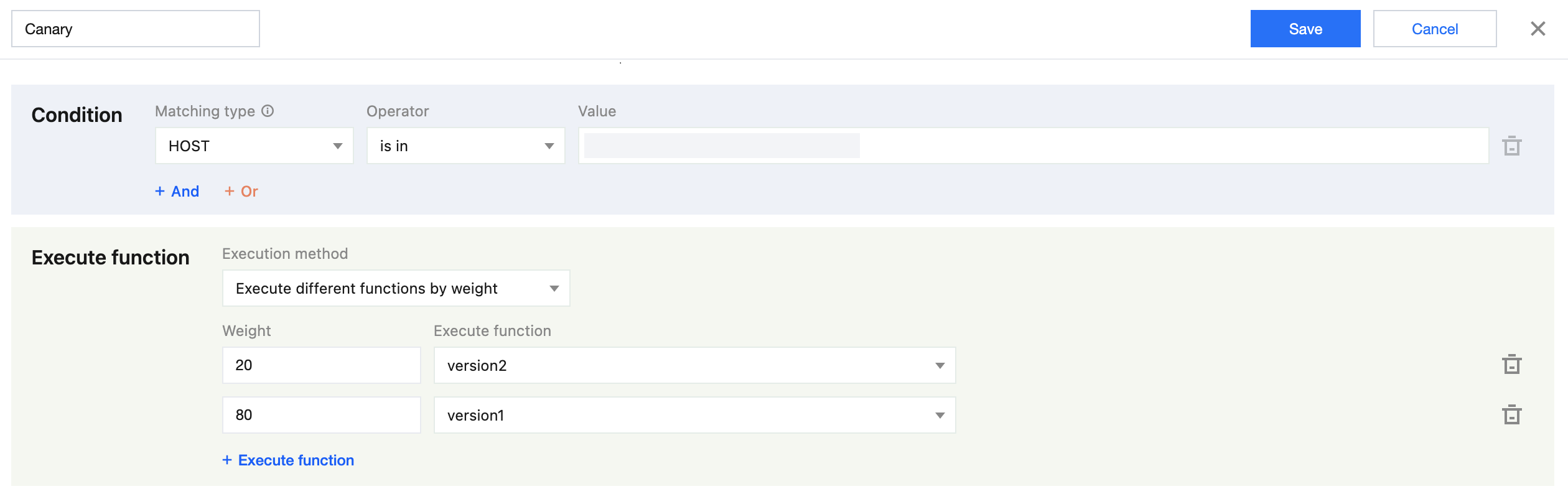
Method 1: Smooth Transition by Weight
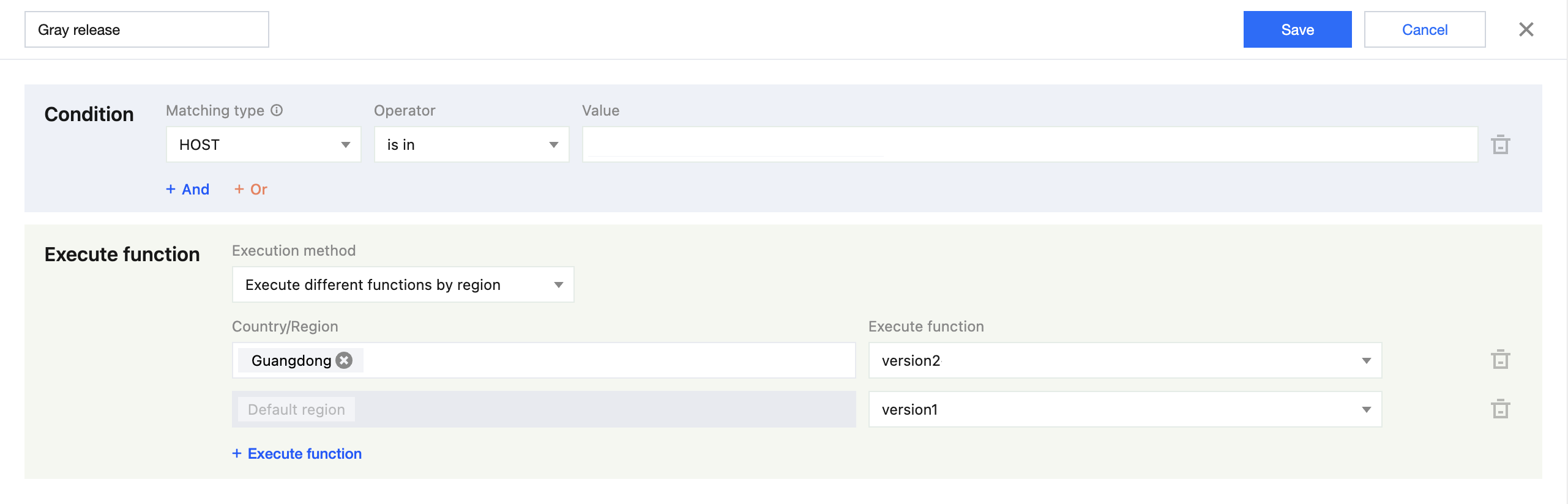
Method 2: Upgrade based on regional grayscale
Example Scenario
Assume you are the technical lead and have deployed your new function version2 to EdgeOne, while the existing function version1 is running stably in the production environment. Now you need to gradually migrate traffic from the old function version1 to the new function version2, achieving a smooth migration by adjusting the weight ratio in stages. The specific traffic allocation is as follows: allocate 20% of the traffic to the new function version2 and 80% to the old function version1. This approach ensures clear traffic allocation at all times, guaranteeing uninterrupted business continuity and a seamless user experience during the migration process, and allowing for rapid rollback.
Directions
1. Log in to the Tencent Cloud EdgeOne console, enter Service Overview in the left menu bar, and click the site to be configured under Website Security Acceleration.
2. On the site details page, click Edge Functions > Trigger Configuration. On the Trigger Configuration page, click Create Trigger Rule
on the right side of the rule list. Based on the current example scenario, the configuration is as follows:
2.1 In the Condition, select HOST equal to www.example.com as the match type.
2.2 In the execution function, select Execute different functions by region as Execute different functions by region.
2.3 Set the weight to 20, and select version2 as the corresponding execution function. This means that 20% of the traffic will execute the new function version2 for small-scale verification.
2.4 Set the weight to 80, and select version1 as the corresponding execution function. The remaining 80% of the traffic will execute the old function version1 to maintain stability.
Note:
The weight configuration range is 1-100. The total weight must be equal to 100, and each weight must correspond to a different execution function. A maximum of 5 functions can be configured.
3. Click Save to complete the configuration of the trigger rule.
Example Scenario
Your business has a strong regional focus, and you wish to migrate traffic in batches by geographic region to reduce the global impact. Switch traffic from the old function version1 to the new function version2 in batches by geographic region, with the following distribution logic: execute the new function version2 in Guangdong, and execute function version1 in other regions.
Directions
1. Log in to the Tencent Cloud EdgeOne console, enter Service Overview in the left menu bar, and click the site to be configured under Website Security Acceleration.
2. On the site details page, click Edge Functions > Trigger Configuration. On the Trigger Configuration page, click Create Trigger Rule
on the right side of the rule list. Based on the current example scenario, the configuration is as follows:
2.1 In the Condition, select HOST equal to www.example.com as the match type.
2.2 In the Execute Function, select Execute different functions by region as the execution method.
2.3 Set the Country/Region to Guangdong to execute the new function version2 for verification. If the configured region is not matched, execute function version1.
Note:
A maximum of 5 functions can be configured. Selected countries/regions must not overlap, and each country/region must correspond to a different execution function. When a function is executed, if no other configured region is found, the function for the default region will be executed.
3. Click Save to complete the configuration of the trigger rule.
Scenario 3: Business scenarios with function-based execution across different regions
Example Scenario
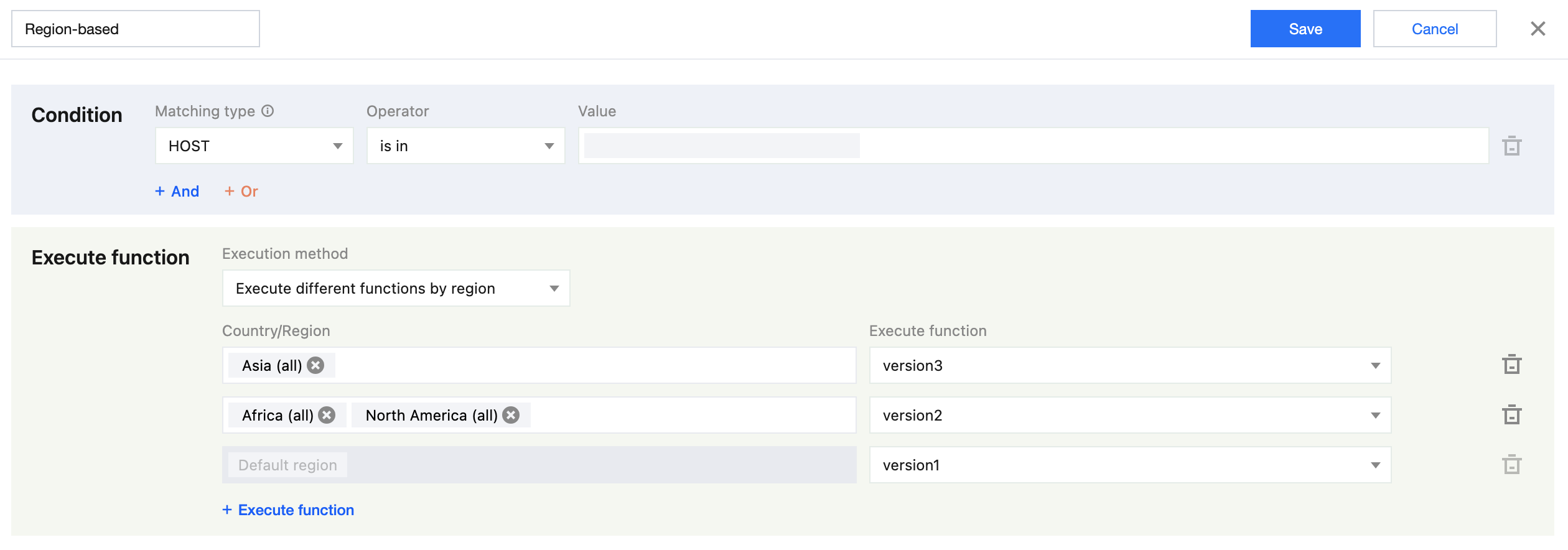
Imagine you are the CTO of a global application service. Faced with user requests from diverse geographical locations worldwide, the domain www.example.com needs to leverage EdgeOne's IP geolocation capabilities to accurately identify the origin region of each request and route it to the corresponding differentiated logic function for processing. Three functions have already been created, named version1, version2, and version3, with the following distribution logic: function version3 is executed in Asia; function version2 is executed in Africa and North America; and function version1 is executed in regions outside these three. This approach ensures that user requests from different regions receive the most optimized or compliance-compliant business logic, achieving global service differentiation and high efficiency.
Directions
1. Log in to the Tencent Cloud EdgeOne console, enter Service Overview in the left menu bar, and click the site to be configured under Website Security Acceleration.
2. On the site details page, click Edge Functions > Trigger Configuration. On the Trigger Configuration page, click Create Trigger Rule
on the right side of the rule list. Based on the current example scenario, the configuration is as follows:
2.1 In the Condition, select HOST equals www.example.com as the matching type.
2.2 In the execution function, select Execute different functions by region as Execute different functions by region.
2.3 Set the Country/Region to execute function version3 for Asia (all), function version2 for Africa (all), and function version1 for North America (all). If no region is matched, function version1 will be executed.
Note:
A maximum of 5 functions can be configured. Selected countries/regions must not overlap, and each country/region must correspond to a different execution function. When a function is executed, if no other configured region is found, the function for the default region will be executed.
3. Click Save to complete the configuration of the trigger rule.