The documentation introduction describes the syntax content and writing norm of conditional expressions in each feature module. The filter conditions in different feature modules use a uniform structure format. The supported target field name, operator, and value type may vary by module.
Expression Structure
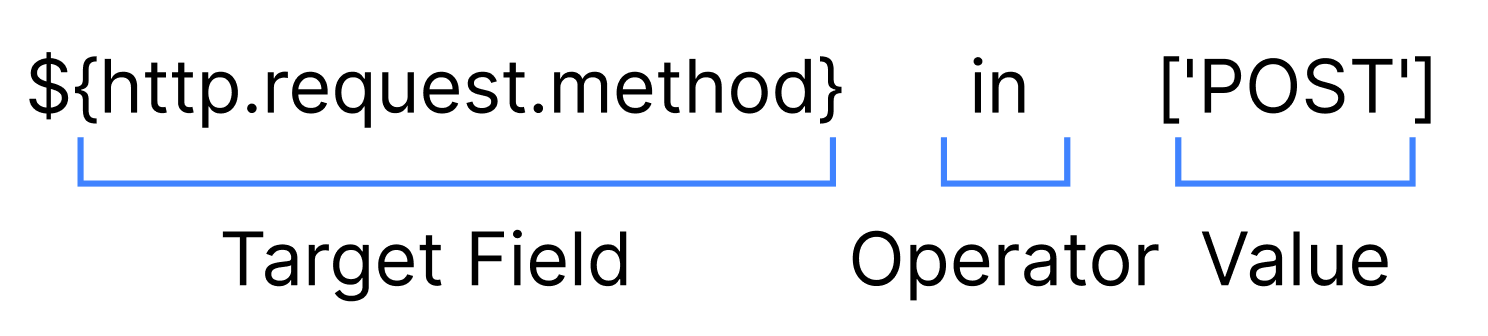
A conditional expression consists of three basic components: target field name, operator, and value. The basic format is as shown below:
Target field: typically a built-in variable in the form of ${…}, such as ${http.request.uri.path}, ${http.request.method}, used to extract specific information from the request.
Operator: such as in, matches, exists, used to judge the relationship between the target field and the value.
Value: can be a string, number, list or other variable, and should be wrapped in square brackets [ ] according to the operator, such as ['POST'] or [100, 200].
Operator
Matching Operator
Name
Keyword
Supported Data Types
Example
Supported Feature Modules
Value in the collection
in
String,Number
Note:
Number supports integer, floating point.
Collections support constants and variables.
${http.request.file_extension} in ["jpg", "png"]
Site acceleration, edge function, Web protection
Regular expression match
matches
only supports String
Note:
Only supports regular expressions defined through value strings.
${http.request.uri.path} matches "^/admin/"
Site acceleration, edge function, Web protection
Exist
exists
Unlimited data types
Note:
The operator checks the existence of a field (key/attribute) but not its value.
${http.request.uri.args["status"]} exists
Site acceleration, edge function, Web protection
Wildcard match
like
only supports String
${http.request.uri.path} like ["/staging/*", "/prod/*"]
The current feature modules all support this operator rule. Multiple conditions can be combined using logical operators.
and: logical and, returns true when all subconditions are true (for example A and B).
or: logical OR, returns true when any subcondition is true (for example A or B).
not: logical not, negates a boolean expression (for example not A).
The operator priority is: not > and > or. You can use parentheses ( ) to alter the operation sequence. For example:
//Means "satisfy both condition A and (condition B or not condition C) at the same time."
${A} and (${B} or not ${C})
Expression Writing Notes
Variable format: Target field variables must be enclosed in ${}, supporting dot notation and index access inside, such as ${http.request.headers['User-Agent']}, ${security.ip_group['123'@'zone-xyz']}.
Value type: String values must be enclosed in single quotes and placed in the list, such as in ['value1','value2']; numeric values can be written directly like > 100; empty values use the special keyword null (see special variables).
List format: Even if there is only one value, it must be written in a list format (encapsulated in square brackets), such as in ['POST'] or in [200].
Quotation marks and escaping: Strings in the list use single quotes. If they contain special characters (such as @, .), no need to escape them.
Case sensitivity: Operators use lowercase (such as and, or, not, in, like, contain). Field names are case-sensitive (for example, User-Agent and user-agent are different).
Note:
Condition matching is case-sensitive by default. If needed, use the conversion function: lower(${http.request.uri.args['Test']}) in ['a', 'b'].
More Examples
Here are some typical conditional expression usage instructions and corresponding code:
1. Match specific path and request method
When the request path is /api/v3/test or /api/v3/submit, and the HTTP request method is POST, it will trigger.
${http.request.uri.path} in ['/api/v3/test','/api/v3/submit'] and ${http.request.method} in ['POST']
2. Match client IP or ASN
Match requests with client IP address 1.1.1.1, belonging to subnet 10.10.10.0/24, or with autonomous system number (ASN) 132203.
${http.request.ip} in ['1.1.1.1','10.10.10.0/24'] or ${http.request.ip.asn} in ['132203']
3. Match specific request header value
Match requests with Referer request header value one.example.com.
${http.request.headers['referer']} in ['one.example.com']
4. Check length
Request body length less than 30.
length(${http.request.body})<30
5. Wildcard path matching
Match request paths beginning with /a/wildcard/path/ or /another/wildcard/path/.
${http.request.uri.path} like ['/a/wildcard/path/*','/another/wildcard/path/*']
6. String contains check
Match request paths containing the substring api or test.
${http.request.uri.path} contain ['api','test']
7. Composite existence and value check
Match requests where the Accepts request header is nonexistent and the CustomHeader request header is an empty string.
not ${http.request.headers['Accepts']} exists and ${http.request.headers['CustomHeader']} in ['']