When the origin server has limited performance, a sudden increase in user requests may cause extremely high QPS, leading to high load or failure on the origin server, affecting the business. To address this scenario, EdgeOne introduced the Origin-pull rate limiting policy feature. It supports user customization based on request features, limiting the maximum QPS for origin-pull requests. For requests exceeding the rate limit, it responds with a specified status code and custom response page to protect the origin server's normal operation.
Note:
Origin-pull Rate Limiting Policy is only available in the EdgeOne Enterprise Edition package. By default, each site can configure up to 5 rate limit policies.
Principle Explanation
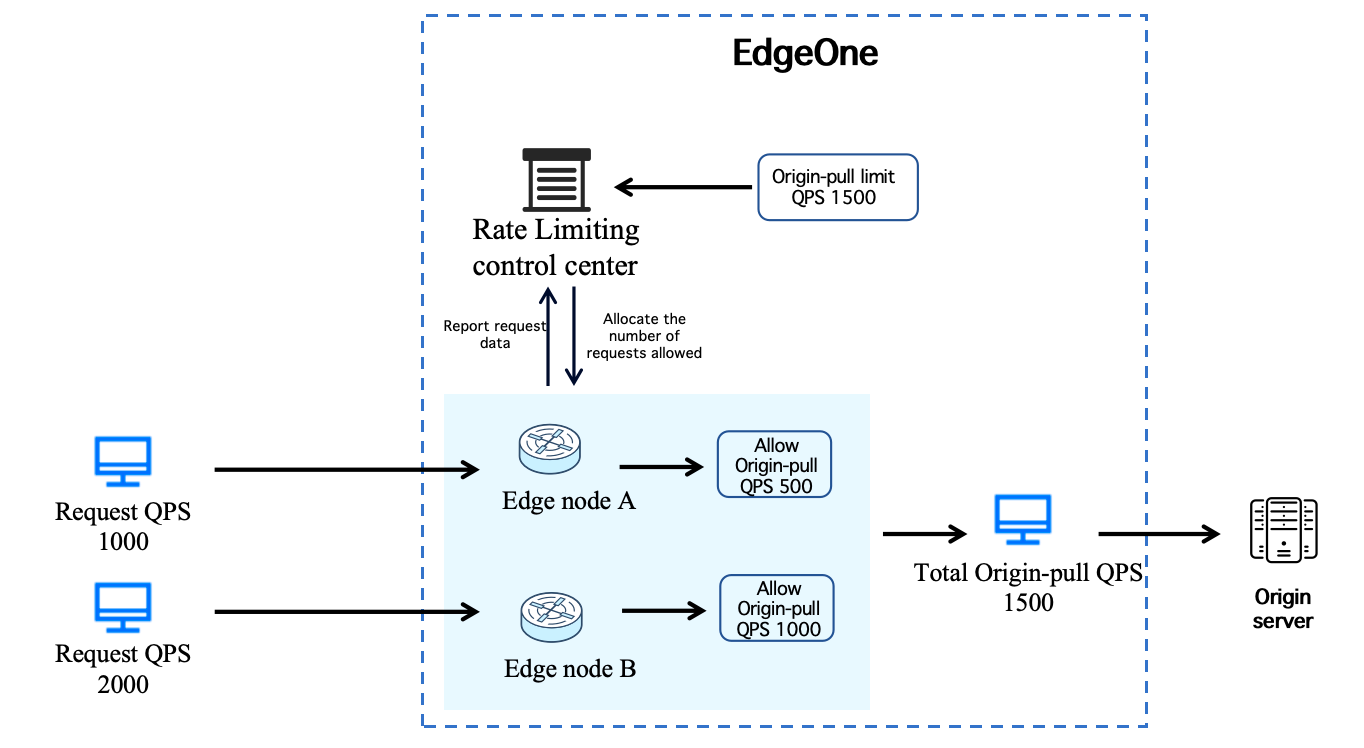
EdgeOne provides users with globally distributed edge node services. Users' requests will return to the origin server through edge nodes in different regions. When requesting origin-pull, EdgeOne periodically collects the origin-pull request volume of all edge nodes, then automatically allocates the allowable origin pull QPS value for each node based on the user-set origin pull rate limit and node count, following a certain percentage. It dynamically adjusts according to changes in edge nodes' request volume to ensure the total origin-pull request volume of all nodes does not exceed the user-defined origin pull rate limit.
Note:
Since data acquisition and learning allocation have a certain delay, the origin pull rate limit QPS needs to run for a while after initial configuration to stabilize.
Origin-pull Rate Limiting Policy is based on edge access request characteristics to collect statistics, match and make effective. If your origin server is an origin server group or Cloud Load Balancer (CLB), origin requests will eventually continue to take effect according to the weight and routing policy of the origin server group or CLB.
Scenario Example 1: Limiting Total Origin-Pull QPS for Dynamic API Request Domain Name
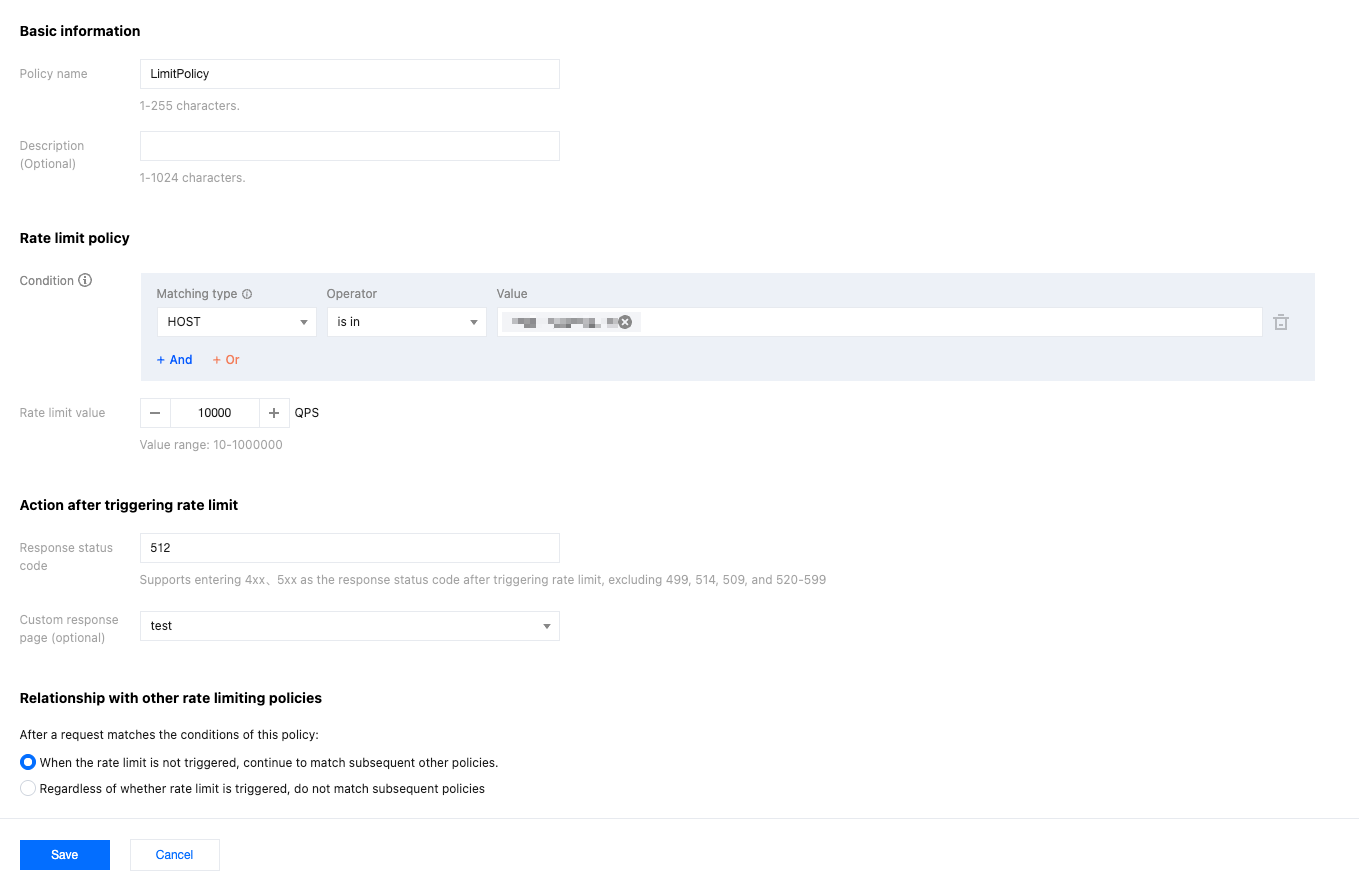
The current domain api.example.com has origin server 1.1.1.1. This domain primarily hosts dynamic API business with high request volume. The origin server can only sustain up to 10,000 QPS at peak performance. To protect the origin server from downtime, limit the origin pull request frequency and return status code 512 for rate-limited requests. Directions:
1. Log in to the Tencent Cloud EdgeOne console, in the left menu bar, enter Service Overview, and click the Website security acceleration site that requires configuration.
2. On the site details page, click Origin-pull rate limiting policy.
3. Click Create Policy, then on the policy configuration interface, refer to Origin Pull Rate Limit Policy configuration item description to complete the setup. Configure according to the current scenario example by selecting the match condition as HOST equals api.example.com, setting the rate limit value to 10,000 QPS, and entering 512 in the response status code. See the following configuration:
4.Click Save to issue configuration. After deployment, the rate limit policy will take effect. The expected result is: if the number of origin-pull requests for domain api.example.com is no more than 10,000 QPS, the system will respond normally; if exceeded, it will return status code 512.
Scenario Example 2: Limiting Total Origin Pull QPS Based on Different Request Paths
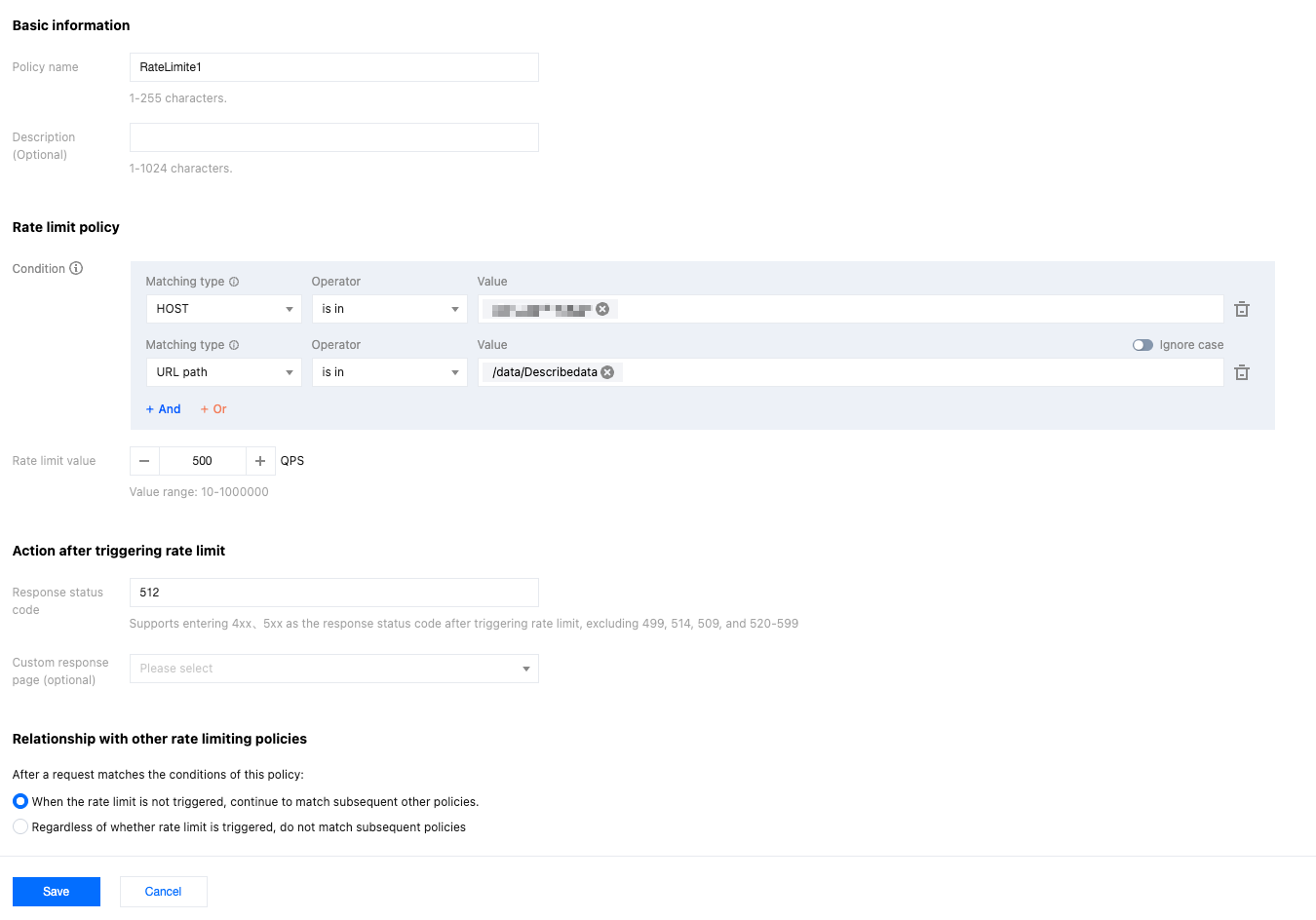
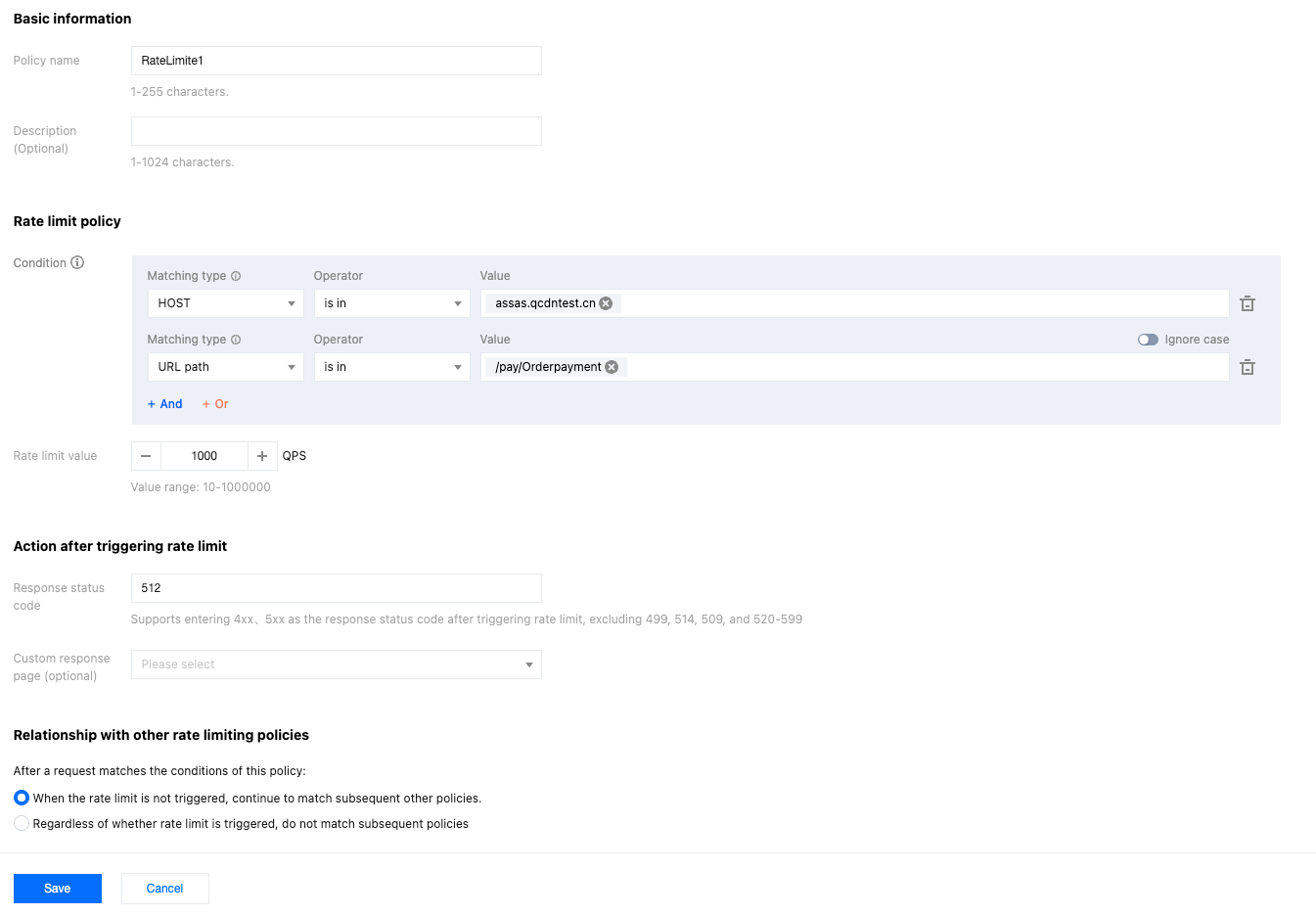
The current domain api.example.com has origin server 1.1.1.1 and multiple external API services. Among them, the data query API is /data/Describedata; the payment API is /pay/Orderpayment. The data query API only allows a maximum QPS of no more than 500, and the payment API cannot exceed 1000 QPS. Exceeding the rate limit will trigger status code 512. Operation steps:
1. Log in to the Tencent Cloud EdgeOne console, in the left menu bar, enter Service Overview, and click the Website security acceleration site that requires configuration.
2. On the site details page, click Origin-pull rate limiting policy.
3. Click Create Policy, and in the policy configuration interface, refer to Origin Pull Rate Limit Policy Configuration Item Description to complete the setup. According to the current example scenario, configure Policy 1 first by selecting the match condition as HOST equals api.example.com AND URL path is in /data/Describedata, setting the rate limit value to 500 QPS, and entering 512 in the response status code. See the following configuration:
4. Click Save to issue configuration. Then repeat procedure 3 to create policy 2, selecting the match condition as HOST equals api.example.com AND URL path is in /pay/Orderpayment, setting the rate limit value to 1000 QPS, and entering 512 in the response status code. See the following configuration:
5. After all the above policies are configured, the expected result is: if a client request targets domain api.example.com with path /data/Describedata, the origin pull request QPS cannot exceed 500 QPS; if the path is /pay/Orderpayment, the origin pull request QPS cannot exceed 1000 QPS. Exceeding these limits will trigger status code 512.
Required. Enter 1-255 characters. Character type is unlimited.
Description
Optional. Enter 0-1024 characters. Character type is unlimited.
Condition
Required. The matching condition determines whether the current request triggers the origin-pull rate limit rule. EdgeOne matches requests initiated by the client. Eligible requests are counted as valid and may trigger rate limiting based on the threshold when origin-pull is required.
Note:
If the request is rewritten for origin-pull through the Rule Engine, Edge Function, etc., such as origin-pull URL rewrite or modifying HTTP request headers, the origin-pull rate limit policy still matches based on the request features before rewriting.
Required, configurable 10-1000000, used to limit the maximum origin pull QPS.
Response status code
Required, the status code to respond when rate limiting is triggered. Supports configuration of 4XX and 5XX, but cannot be configured as 499, 514, 509, or 520-599.
custom response page
Optional, supports drop-down selection of currently configured custom response page.
Relationship with other rate limiting policies
When multiple origin-pull rate limit policies are configured, the same request may match multiple policies. The priority of rate limiting is determined by matching them one by one from top to bottom. You can also configure below to determine whether the current request stops matching other origin-pull rate limit policies.
When the rate limit is not triggered, continue to match subsequent other policies: If there are other rate limit policies below, the system will continue matching them to determine whether to apply rate limiting when the current origin-pull rate limit policy is not triggered.
Regardless of whether rate limit is triggered, do not match subsequent policies: When a request matches the current origin-pull rate limit policy, if the rate limit value is reached, it will be handled according to the current policy. If the rate limit value is not reached, normal back-to-origin will proceed without matching the policies below.