

Attestation Flow
The client, SDK, EdgeOne edge, and attestation service are the primary participants in the client attestation process. Through collaboration in the attestation process, they ensure the legitimacy and validity of the request source, preventing unauthorized access and malicious attacks. Mastering and correctly using the client attestation process can effectively reduce security risks and improve the overall reliability of the service. This document explains in detail the specific operation steps of client attestation to help developers and users quickly understand and effectively use the JWT attestation feature, ensuring application security and stability.
Attestation Process Adaptation for Different Clients
Client attestation provides corresponding attestation processes based on client type to offer flexible and convenient integration options to the maximum extent.
Attestation Process | Mobile Terminal (Android & iOS) | WebView / Browser |
SDK integration method | Client Development Integration | Auto-integration (JS injection) Manual integration (frontend page adaptation integration) |
Trigger client attestation (generate credentials) | Integration required | No need to integrate (automatic processing by SDK) |
Handle challenges (supplement attestation as needed) | | |
Retrieve existing credentials (query existing attestation) | | |
Embed credentials in request (application attestation credential) | | |
Attestation Process
The client attestation process includes the following key stages. The specific operation method, use cases, and performance at the network request level for each stage are introduced one by one:
1. Process Overview
Actively initiate client attestation to generate a new attestation token (Attestation Token) and ensure subsequent API requests come with valid credentials. By actively triggering client attestation, the SDK performs a complete validation of the current device and application, then returns an encrypted attestation token to certify that the client meets security requirements. The token contains information such as the attestation platform, attestation method, and timestamp, and cannot be tampered with manually.
2. Use Cases
During client application initialization, perform a new attestation manually. For example, when a user installs and starts the App for the first time, the client will actively initiate attestation to create a trusted identity.
After the attestation credential expires, the client re-authenticates. If the user has not performed any operation for a long time or switches accounts, the existing attestation credential will expire, and the client will automatically re-authenticate to ensure security.
When processing server challenges, the client performs attestation based on challenge requirements. For specific key operations or sensitive API access, the server may enforce re-attestation to prevent credential misuse.
3. Operation Process and Data Processing:
3.1 The client identifies that a new attestation credential is required (if not or invalid).
3.2 The client establishes an encrypted connection with the attestation service, initiates an attestation request, and submits device and application information.
3.3 The attestation service verifies the client and completes identity verification.
3.4 After verification passes, the attestation service issues new credentials and returns them to the client to save locally for use in subsequent requests.

4. Expected client behavior
Note:
In this process, the request is triggered by the client application. The SDK typically sends a verification request to the preconfigured attestation service provider, which validates the client data and returns a credential. Since this is a predefined credential obtaining process and no API call is initiated to the business backend, the business server provides no direct response.
Client SDK communication with the attestation service can be observed on the network. The specific communication objects depend on the configured attester type (such as device verification, graphic verification code). Upon successful completion, the client obtains a valid attestation token.
1. Process Overview
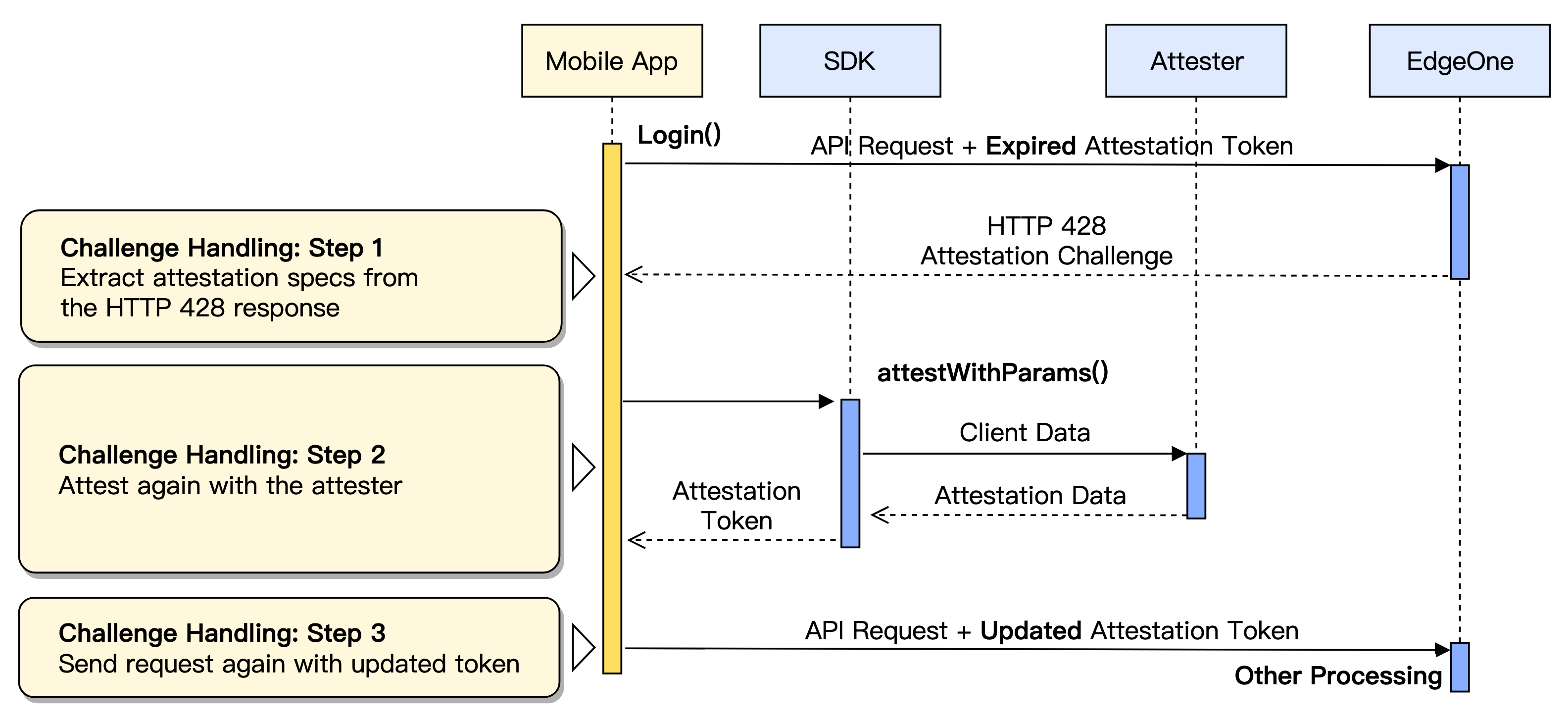
When a client request does not carry valid credentials or the credentials have expired, the server will deny the request and initiate an attestation challenge with HTTP status code 428. This process will guide the client to complete supplementary attestation as required by the server.
2. Use Cases
On the client's first visit to a protection interface. For example: when a user has just logged in or is not authenticated and accesses a business API, the server will prompt the client with a 428 notification to complete first-time attestation.
Client credentials expire or are revoked. For example: when an App has no operation in the background for a long time, or credentials become invalid due to environment changes, supplementary attestation will be triggered upon user retry.
In high-security requirement scenarios, the server proactively requests re-attestation. For example: when a user attempts to perform a transaction or modify key settings, the server requires the latest attestation to ensure operation risks are controllable.
3. Operation Process and Data Processing
3.1 The client initiates a request to the business service. The server detects invalid or missing credentials, returns HTTP 428, and provides attestation challenge information (client attestation ID) in the response header.
3.2 The client parses the challenge info in the response header to determine which attestation to complete.
3.3 The client interacts with the attestation service again, supplements attestation information based on the challenge content, and completes the attestation operation.
3.4 After verification passes, the attestation service issues new credentials, and the client saves them.
3.5 The client resends the original request and adds the new credentials to the request header.
Note:
After the client successfully acquires a new credential, it must correctly add the credential to the request and re-access resources. If it encounters a 428 status code again, re-execute the supplementary attestation process.
4. Expected client behavior
Note:
Note: Partial attestation data is encrypted, and the content cannot be directly observed externally. Therefore, the attestation process status can only be judged by the HTTP status code and whether the header contains a specific header.
On the first request, the server responds with HTTP 428 and includes the attestation challenge
EO-Attest-Challenge header.After the client completes supplementary attestation, it will include new credentials in the
EO-Attest-Token header when requesting again.1. Process Overview
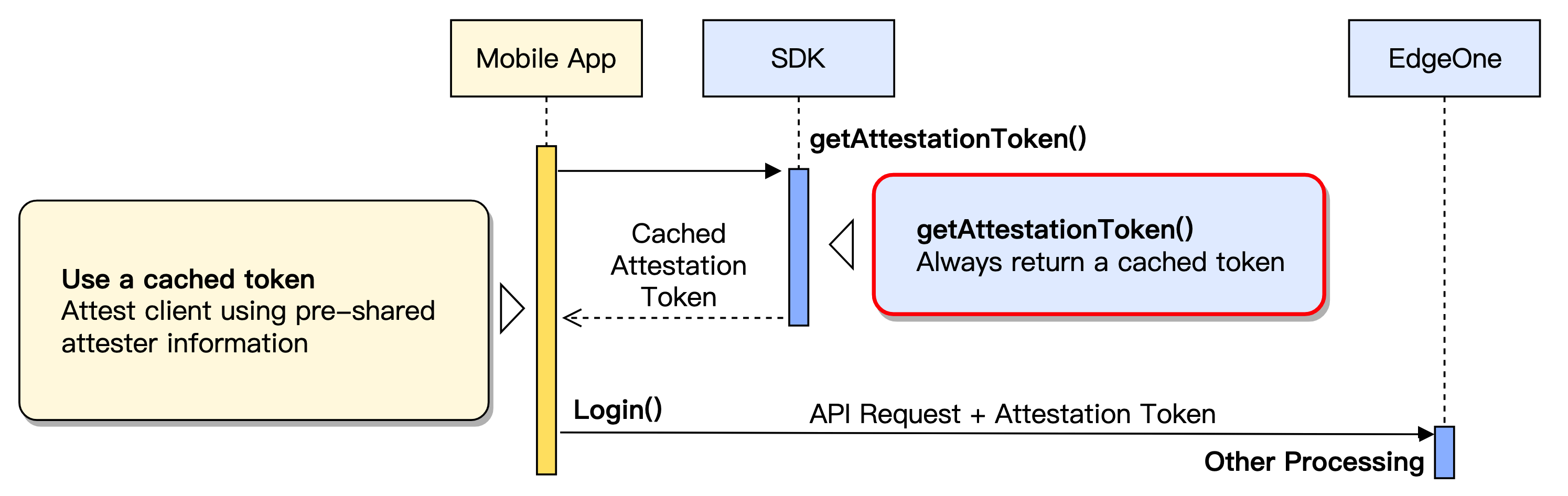
Client attestation credentials have a valid period. During the period when the credentials are still valid, the client can use cached credentials repeatedly without the need to re-authenticate every time, enhancing performance and reducing additional interaction.
2. Use Cases
Application warm startup or return to foreground, continue the existing session.
During multiple requests, the credential remains within the validity period.
When recovering from a network outage, attempt to reuse existing credentials.
3. Operation Process and Data Processing:
3.1 Check the local attestation credential cache to determine whether a valid unexpired credential exists.
3.2 If a valid credential exists, all subsequent API requests can reuse it without re-attestation.
3.3 If the credential is invalid or does not exist, return to the trigger client attestation (generate credentials) procedure and re-initiate attestation.
4. Expected client behavior
Note:
In process, only when an API request is triggered, the server checks the credential in the request header to determine its validity. External parties can only judge the actual usage by whether the request header contains a valid attestation credential (such as EO-Attest-Token) and the server response status.
When querying credentials locally, there is no need to communicate with the server, as all operations are done locally. The client can reuse local credentials to initiate business requests normally, and the server will return business responses directly without additional attestation steps. If the credential expires, the server will return a 428 status code and automatically proceed to the supplementary attestation process.
1. Process Overview
The core purpose of attestation credentials is to certify to the business service via the request header that the client has completed attestation. The server only processes requests carrying valid credentials.
2. Use Cases
The client calls business APIs for login, registration, payment, and order placement. For example: When the client prepares the API call parameters and will already access the API interface, it should embed effective client attestation credentials in the request so that the server can immediately verify and confirm, reducing unnecessary challenges and repetitive attestation processes.
3. Operation Process and Data Processing:
3.1 When the client prepares to initiate an API request, it adds the local attestation credentials to the HTTP request using the
EO-Attest-Token request header.3.2 After receiving the request, the server parses and validates the credential content.
3.3 If the credential is valid, the server allows the request and returns a business response.
3.4 If the credential is missing or invalid, the server returns an HTTP 428 status code, requiring the client to supplement attestation.
4. Expected client behavior
Note:
In this process, the request is triggered by the client application. The SDK typically sends a verification request to the preconfigured attestation service provider, which validates the client data and returns a credential. Since this is a predefined credential obtaining process and no API call is initiated to the business backend, the business server provides no direct response.
All protected API requests from the client will include the
EO-Attest-Token attestation credential header. The server uses this to verify the validity of the request. If the request header contains a valid credential, the server should return normal business data. If the credential is non-compliant or missing, the server returns HTTP 428, requiring re-attestation.