Edge Acceleration
  • Site Acceleration
    • Overview
    • Access Control
      • Token authentication
        • Token Authentication
        • Authentication Method A
        • Authentication Method B
        • Authentication Method C
        • Authentication Method D
        • Authentication Method V
    • Smart Acceleration
    • Cache configuration
      • Overview
      • EdgeOne caching rules introduction
        • Content Cache Rules
        • Cache Key Introduction
        • Vary Feature
      • Cache Configuration
        • Custom Cache Key
        • Node Cache TTL
        • Status Code Cache TTL
        • Browser Cache TTL
        • Offline Caching
        • Cache Prefresh
      • Clear and Preheat Cach
        • Cache Purge
        • URL Pre-Warming
        • Prefetch M3U8
      • How to improve the Cache Hit Rate of EdgeOne
    • File Optimization
      • Content Compression
      • Smart Compression
    • Network Optimization
      • HTTP/2
      • HTTP/3(QUIC)
        • Overview
        • Enable HTTP/3
        • QUIC SDK
          • SDK Overview
          • SDK Download and Integration
          • Sample Code
            • Android
            • iOS
          • API Documentation
            • Android
            • iOS
      • IPv6 Access
      • Maximum Upload Size
      • WebSocket
      • Client IP Geolocation Header
      • Client IP Geographical Location
      • gRPC
      • Network Error Logging
    • URL Rewrite
      • Access URL Redirection
      • Origin-Pull URL Rewrite
    • Modifying Header
      • Modifying HTTP Response Headers
      • Modifying HTTP Request Headers
    • Modify response content
      • HTTP Response
      • Custom Error Page
    • Rules Engine
      • Overview
      • Rule Management
      • variables
      • Supported Matching Types and Actions
    • Image and video processing
      • Audio and Video Pre-pulling
      • Just-in-Time Image Processing
      • Video Just-In-Time Processing
      • VOD Media Origin
    • Speed limit for single connection download
    • Request and Response Actions
      • HTTP Response
      • Processing order
      • Default HTTP Headers of Origin-Pull Requests
      • Default HTTP Response Headers
      • HTTP Restrictions
    • Media Services
      • Audio and Video Pre-pulling
      • Just-in-Time Image Processing
      • Just-in-Time Media Processing
      • VOD Media Origin
  • L4 Proxy
    • Overview
    • Creating an L4 Proxy Instance
    • Modifying an L4 Proxy Instance
    • Disabling or Deleting an L4 Proxy Instance
    • Batch Configuring Forwarding Rules
    • Obtaining Real Client IPs
      • Obtaining Real TCP Client IPs via TOA
      • Obtaining Real Client IPs Through Protocol V1/V2
        • Overview
        • Method 1: Obtaining Real Client IPs Through Nginx
        • Method 2: Parsing Real Client IPs on Application Server
        • Format of Real Client IPs Obtained Through Proxy Protocol V1/V2
      • Transmitting Client Real IP via SPP Protocol
  • Domain name service and origin server configuration
    • Domain Name Services
      • Overview
      • DNS resolution for managed domains
        • Modifying DNS Servers
        • Configuring DNS Records
        • Batch Importing DNS Records
        • Advanced DNS Configuration
      • Access accelerated domains
        • Adding A Domain Name for Acceleration
        • Ownership Verification
        • Modifying CNAME Records
        • Verify Business Access
      • Traffic scheduling
        • Traffic Scheduling Management
    • HTTPS Certificate
      • Overview
      • Edge HTTPS Certificate
        • Overview
        • Deploying/Updating SSL Certificate for A Domain Name
        • Configuring A Free Certificate for A Domain Name
        • Using Keyless Certificate
      • Edge mTLS Authentication
      • Origin Certificate Validation
      • HTTPS configuration
        • Forced HTTPS Access
        • Enabling HSTS
        • SSL/TLS security configuration
          • Configuring SSL/TLS Security
          • TLS Versions and Cipher Suites
        • Enabling OCSP Stapling
      • Related References
        • Using OpenSSL to Generate Self-Signed Certificates
        • Certificate Format Requirements
        • The Difference Between one-way authentication and Mutual authentication
    • Origin Configuration
      • Load Balancing
        • Overview
        • Quickly Create Load Balancers
        • Health Check Policies
        • Viewing the Health Status of Origin Server
        • Related References
          • Load Balancing-Related Concepts
          • Introduction to Request Retry Strategy
      • Origin Group Configuration
      • Origin configuration
        • Origin-Pull Timeout
        • Configuring Origin-Pull HTTPS
        • Host Header Rewrite
        • Controlling Origin-pull Requests
        • Redirect Following During Origin-Pull
        • HTTP/2 Origin-Pull
        • Range GETs
        • Modify Origin
        • Origin-pull Rate Limiting Policy
      • Origin Protection(Obtaining/Updating Origin IP Address Range)
      • Related References
        • ld Version Origin Group Compatible Related Issues

The Difference Between one-way authentication and Mutual authentication

One-way authentication only requires the server to have a certificate, and the client doesn't need to have one. Mutual authentication requires both the client and the server to have certificates, and both parties must verify each other successfully to complete the SSL handshake.

SSL One-way Authentication

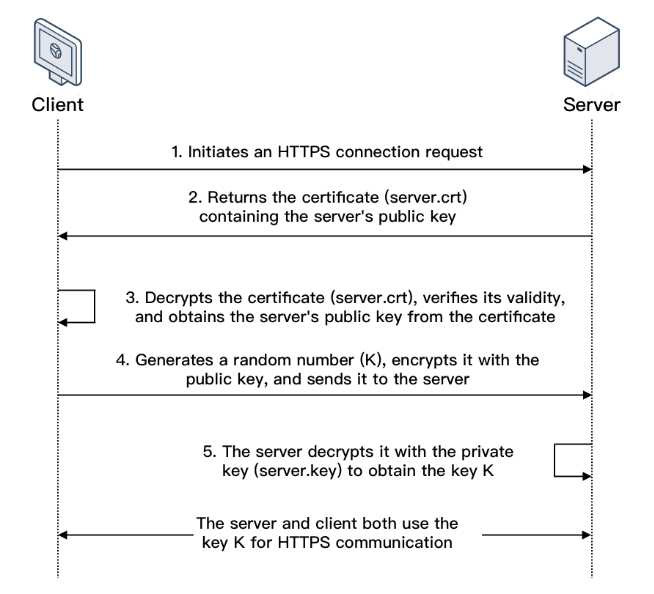
In SSL one-way authentication, only the server identity but not the client identity needs to be verified. The process of SSL one-way authentication is as shown below:


1. A client initiates an HTTPS connection request to the server together with the supported SSL protocol versions, encryption algorithms, generated random numbers, and other information.
2. The server returns an SSL protocol version, encryption algorithm, generated random number, server certificate (server.crt), and other information to the client.
3. The client verifies the validity of the certificate (server.crt) for the factors below and obtains the server's public key from the certificate.
4. After the certificate is verified, the client will generate a random number (the key K; which is used as the symmetric encryption key for the communication), encrypt it with the public key obtained from the server certificate, and then send it to the server.
5. After receiving the encrypted information, the server will use its private key (server.key) to decrypt it to obtain the symmetric encryption key (the key K).The symmetric encryption key (the key K) will be used by the server and client for communication to guarantee information security.


SSL Mutual Authentication

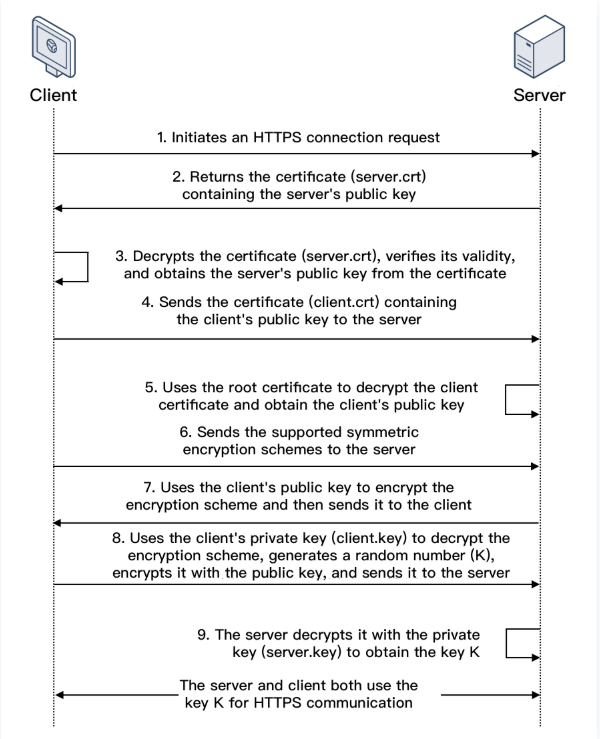
In SSL mutual authentication, the server identity and the client identity both need to be verified. The process of SSL mutual authentication is as shown below:


1. A client initiates an HTTPS connection request to the server together with the supported SSL protocol versions, encryption algorithms, generated random numbers, and other information.
2. The server returns an SSL protocol version, encryption algorithm, generated random number, server certificate (server.crt), and other information to the client.
3. The client verifies the validity of the certificate (server.crt) for the factors below and obtains the server's public key from the certificate.
4. The server requires the client to send the client certificate (client.crt), and the client does so as required.
5. The server verifies the client certificate (client.crt). After it is verified, the server will use the root certificate to decrypt the client certificate and obtain the client's public key.
6. The client sends the supported symmetric encryption schemes to the server.
7. The server selects the encryption scheme with the highest encryption level from the schemes sent from the client, uses the client's public key to encrypt it, and returns it to the client.
8. The client uses its private key (client.key) to decrypt the encryption scheme and generate a random number (the key K; which is used as the symmetric encryption key for the communication), encrypts it with the public key obtained from the server certificate, and then sends it to the server.
9. After receiving the encrypted information, the server will use its private key (server.key) to decrypt it to obtain the symmetric encryption key (the key K).The symmetric encryption key (the key K) will be used by the server and client for communication to guarantee information security.