
Edge Developer Platform
  • Edge Functions
    • Overview
    • Getting Started
    • Operation Guide
      • Function Management
      • Web Debugging
      • Function Trigger
      • Environment Variable
      • Code Replica
    • Runtime APIs
      • addEventListener
      • Cache
      • Cookies
      • Encoding
      • Fetch
      • FetchEvent
      • Headers
      • Request
      • Response
      • Streams
        • ReadableStream
        • ReadableStreamBYOBReader
        • ReadableStreamDefaultReader
        • TransformStream
        • WritableStream
        • WritableStreamDefaultWriter
      • Web Crypto
      • Web standards
      • Images
        • ImageProperties
    • Sample Functions
      • Example Overview
      • Obtaining Client URL Information
      • Customization Based on Client Geo Location
      • Obtaining Client Geo Location Information
      • Batch Redirect
      • URL rewrite based on regular expressions
      • Returning an HTML Page
      • Returning a JSON Object
      • Fetch Remote Resources
      • Authenticating a Request Header
      • Modifying a Response Header
      • Performing an A/B Test
      • Setting Cookies
      • Performing Redirect Based on the Request Location
      • Using the Cache API
      • Caching POST Requests
      • Responding in Streaming Mode
      • Merging Resources and Responding in Streaming Mode
      • Protecting Data from Tampering
      • Rewriting a m3u8 File and Configuring Authentication
      • Adaptive Image Resize
      • Image Adaptive WebP
      • Customize Referer restriction rules
      • Remote Authentication
      • HMAC Digital Signature
      • Naming a Downloaded File
      • Obtaining Client IP Address
      • Complex origin-pull URL rewriting
      • Web Bot Auth
    • Practical Tutorial
      • Overview
      • Origin retrieval based on user IP/geographic location
        • EdgeOne Implementation of Session Persistence Based on Client IP Addresses
        • EdgeOne Implementation of Origin-Pull Based on Client's Geo Location
      • APK dynamic packaging
        • EdgeOne enables dynamic packaging of Android APKs.
          • Feature Overview
          • Step 1: Preprocess the Android APK Parent Package
          • Step 2: Write the Channel Information into the APK Package with EdgeOne Edge Functions
      • Canary Release and Region-specific Execution
      • Adaptive Image Format Conversion via Edge Functions
      • Two Ways to Implement CDN Origin-pull Via Edge Function: Fetch and Passthrough
  • KV Storage
    • Overview
    • Operation Guide
  • Edge reasoning
    • Edge Inference Overview
    • Quick Guide

Obtaining Client URL Information

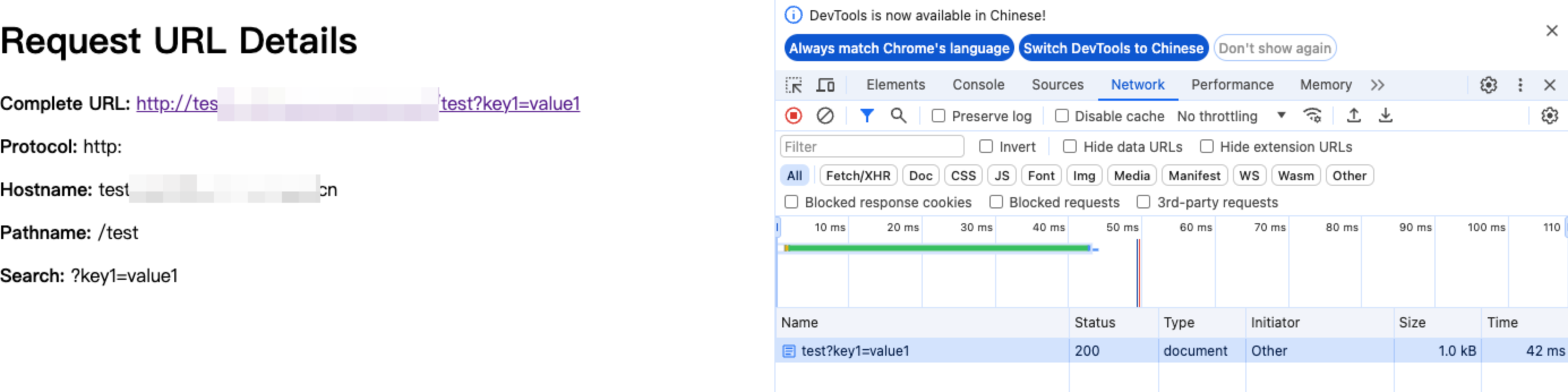
This example captures incoming HTTP requests and returns an HTML page displaying the detailed information about the request URL. It can be used for debugging and displaying the request parameters, paths, and sources.

Sample Code

// Add a fetch event listener, which is triggered when a request is incoming. It uses the handleRequest function to handle requests and return responses.
addEventListener('fetch', event => {
event.respondWith(handleRequest(event.request))
})

function handleRequest(request) {
// Parse the request URL.
const url = new URL(request.url)

// Extract various components of the URL.
const {
href, // Full URL
protocol, // Protocol (e.g., http:)
hostname, // Host name (e.g., example.com)
port, // Port (if specified)
pathname, // Path (e.g., /path)
search, // Query string (e.g., ?query=123)
hash // Fragment after the hash sign (e.g., #section)
} = url

// Construct the HTML response content.
const htmlContent = `
<!DOCTYPE html>
<html lang="en">
<head>
<meta charset="UTF-8">
<meta name="viewport" content="width=device-width, initial-scale=1.0">
<title>Request URL Details</title>
</head>
<body>
<h1>Request URL Details</h1>
<p><strong>Complete URL:</strong> <a href="${href}">${href}</a></p>
<p><strong>Protocol:</strong> ${protocol}</p>
<p><strong>Hostname:</strong> ${hostname}</p>
${port ? `<p><strong>Port:</strong> ${port}</p>` : ''}
<p><strong>Pathname:</strong> ${pathname}</p>
<p><strong>Search:</strong> ${search}</p>
${hash ? `<p><strong>Hash:</strong> ${hash}</p>` : ''}
</body>
</html>
`;

// Return a response in HTML format.
return new Response(htmlContent, {
headers: {
'Content-Type': 'text/html;charset=UTF-8'
}
})
}

Sample Preview

In the address bar of the browser, enter a URL that matches a triggering rule of the edge function to preview the effect of the sample code.

Related References