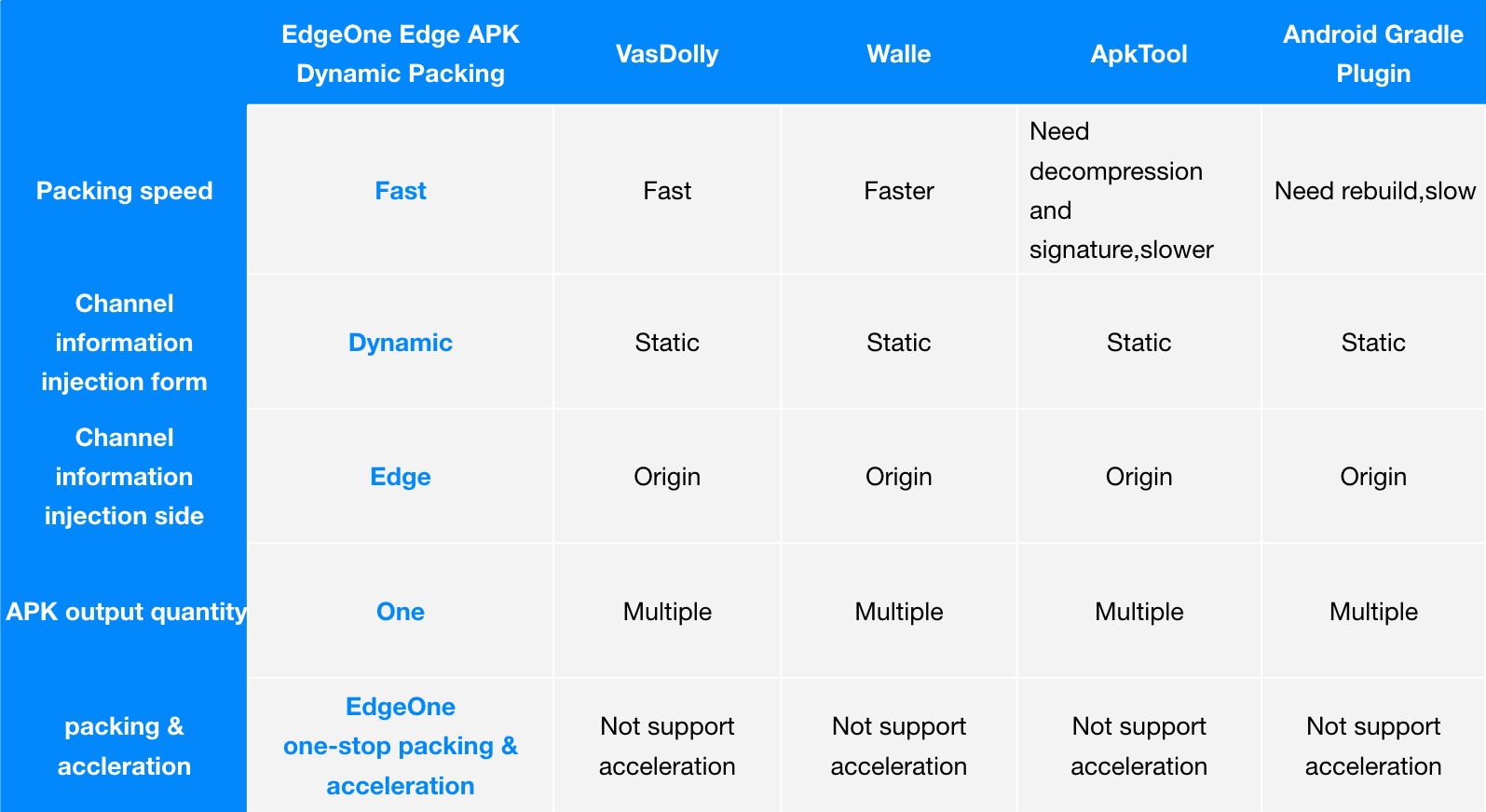
This document primarily outlines the approach to implement a dynamic packaging solution for Android APK multichannel at the edge using Tencent Cloud's EdgeOne, COS (Cloud Object Storage), and SCF (Serverless Cloud Function) products. Compared to traditional packaging methods, this solution provides a one-stop dynamic packaging and acceleration capability, reducing the maintenance complexity of multichannel APK packages and lowering the integration cost.
The solution supports multi-channel packaging based on Android APK V1/V2 signatures, where the V2 signature method is compatible with open-source multi-channel packaging solutions VasDolly and Walle. It also supports customizing channel packaging through v2-Custom to write channel information into specified blockId, meeting diverse needs for channel distribution and statistics.
Background Introduction
APK (Android Application Package) is the installation package for Android applications. When an app releases a new version, it typically requires the creation of distinct channel installation packages for each distribution channel. These packages are then uploaded to the respective application markets. After users download and install the app from a specific channel, they subsequently report data. Management personnel utilize channel identifiers to track key data for each channel, such as channel download volume, conversion rates, and other critical metrics. However, the following challenges are encountered:
1. High Maintenance Cost of Channel Packages: After completing Android app development, it is typically promoted across various channels online and offline, including online app markets, affiliate networks, search engines, and offline promotions. The total number of online and offline channel partners can reach up to thousands. Maintaining a set of channel packages for each channel incurs high costs and is inefficient.
2. Difficulty in Channel Statistics: In the scenario of having multiple channels, it is necessary to calculate the installation-to-payment conversion rates for different channels. However, traditional channel analytics rely on methods like invitation codes or manual processes, leading to suboptimal results in automated statistics.
3. Inefficient Acceleration: When using CDN for APK download acceleration, each APK channel package requires individual caching, leading to uneven acceleration effects.
Therefore, against this backdrop, EdgeOne has introduced the dynamic packaging solution for multi-channel Android APKs at the edge.
Principle Introduction
The implementation of dynamic packaging for Android APK multichannel involves the following key conditions:
1. Preprocessing of APK Package: Inject blank data into the APK parent package and process it into a valid file.
2. Channel Information Injection during APK Package Download: Dynamically inject channel information into the appropriate location of the APK package when the user initiates a download operation, returning the modified APK for user download.
By employing the above approach, the decoupling of preprocessed APK packages and the channel information injection operation is achieved. The entire solution process is illustrated in the diagram below:
Solution Advantages
1. Reduced Channel Package Maintenance Costs: Developers only need to maintain an original Android APK parent package, eliminating the need to manage individual packages for each channel partner. EdgeOne provides default packaging tools, allowing users to deploy easily through simple UI configuration templates, significantly enhancing the efficiency of multichannel packaging.
2. Accurate and Efficient Channel Statistics: Users can trigger edge functions by accessing a URL with channel parameters, dynamically inserting channel identifiers into the APK package, and returning it for user download. Simultaneously, data reporting and statistics are efficiently completed.
Directions
Suppose you are a game manufacturer with a new Android app game (example: v2_src.APK) that you want to release across various channels to increase exposure and attract more players. These channels may include major app markets, app stores, social media platforms, game forums, advertising platforms, etc. Your goal is to efficiently inject channel identifiers, track channel revenue, and accelerate the download of the APK for each channel. The distribution will be centralized using the domain apk.example.com.